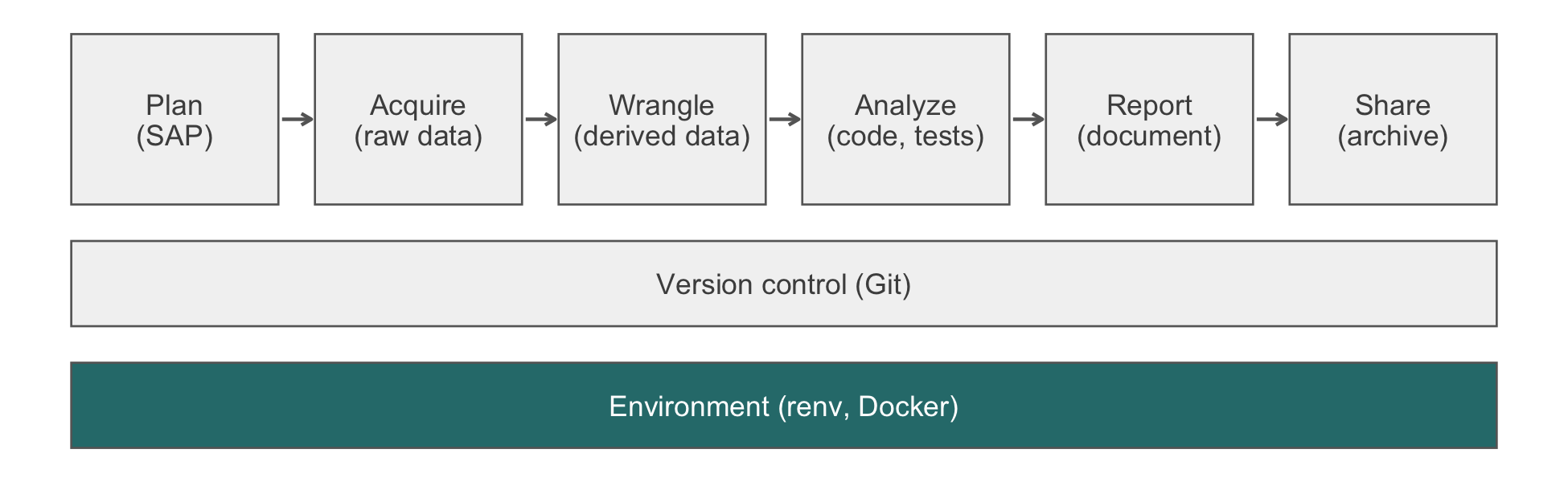
renv pins the R packages in the Environment band, which runs under every stage of the analysis.
A project that worked in January may fail in July because a dependency changed underneath it. A failure is the easy case, because it is noticed and gets fixed. The dangerous case is the one where nothing fails. The code still runs, the report still renders, and one of the numbers is different, because a default changed or a tie is now broken the other way. Suppose an analyst re-runs the old analysis and gets a slightly different table. Without a record of what was installed the first time, the analyst cannot tell a genuine correction from a silent regression. renv supplies that record. It pins the exact package versions a project uses in a lockfile, so that any discrepancy can be traced to a specific change.
Controlling complexity is the essence of computer programming.
Brian W. Kernighan and P. J. Plauger, Software Tools (1976)
renv pins the R packages in the Environment band, which runs under every stage of the analysis.
Reading time. About 20 minutes.
You’ll need. Chapter 7 for commits and tags. The compendium layout the chapter mentions in passing is assembled in full in Section 11.1, later in this part. The chapter calls every renv function with its namespace (renv::snapshot()), so it needs no library() call; install the package once with install.packages("renv").
You’ll be able to.
renv in a new or existing project and state which of its files are committed.renv::snapshot() and renv::restore() from the report of renv::status().Outline.
If these answers come quickly, skip to the next chapter. The answers are in Section 9.10.
renv::init() do to a project directory, and what new files does it create?renv.lock, and why is the lock file version-controlled while renv/library/ is not?renv::snapshot() and renv::restore()?renv (Ushey & Wickham, 2026) succeeded packrat, now deprecated, and is maintained by Posit. It is the standard for project-level R package management. There are only three verbs to learn, and they behave exactly as documented. What renv cannot decide is when to use them. A lockfile snapshotted at the wrong moments records a history nobody can read.
# in a new or existing project
renv::init()
init() creates the files in Table 9.1. It also writes renv/.gitignore, which keeps the library out of Git.
renv::init() creates.
| File | Role | Committed? |
|---|---|---|
renv.lock |
The lockfile: every package’s version and source | Yes |
.Rprofile |
Runs source("renv/activate.R") at session start |
Yes |
renv/activate.R |
The bootstrap script that activates the project library | Yes |
renv/settings.json |
Project-specific renv settings |
Yes |
renv/library/ |
The project library of installed packages | No |
The .Rprofile bootstrap is the right default. It ensures that collaborators get the project library without thinking about it. Disable it only for a specific reason, such as a shared server project where users deliberately run different package versions.
After init(), .libPaths() returns the project library first, so install.packages("dplyr") installs into the project’s library, not your global one. On macOS the result looks like this (display-only; paths vary by machine):
.libPaths()
#> [1] "/path/to/project/renv/library/macos/R-4.4/x86_64"
#> [2] "/Users/you/Library/Caches/org.R-project.R/R/renv/sandbox/..."
The second entry is the sandbox. It is a read-only library holding only R’s base and recommended packages, and it keeps packages from your global library out of the project. The package cache does not appear in .libPaths() at all. It sits behind the project library, which links to it. The cache is shared across projects on the same machine, so installing a package another project already has is fast.
The two verbs at the center of renv move in opposite directions across the same boundary, as Figure 9.2 shows. snapshot() reads the state of your project library and writes it to renv.lock. restore() reads renv.lock and rebuilds the library to match. The lockfile is the durable record that travels in Git. The library is the disposable build product it regenerates.
flowchart LR
  L["Project library<br/><i>installed packages</i>"] -->|"renv::snapshot()"| F["renv.lock<br/><i>versioned in Git</i>"]
  F -->|"renv::restore()"| L
The core workflow (display-only, because it changes a project library):
install.packages("ggplot2")
renv::snapshot()
# then, in the shell:
# git add renv.lock && git commit -m "Add ggplot2"
renv::snapshot() finds the packages your code references, by the static scan described in Section 9.3. It looks up the versions installed in the project library and updates renv.lock. To recreate the environment elsewhere, clone the repository and run:
renv::restore()This installs exactly the recorded versions into the project library. The first restore takes a while (downloads and builds); later restores reuse the cache.
Snapshot at meaningful moments, not after every install.packages(). These are project start, any intentional change to a dependency, and each submission. A snapshot after every install produces noisy commits. The lockfile’s Git history is the record of the project’s dependencies, so keep it readable.
status()
renv::status() compares three things (the packages your code uses, the project library, and the lockfile) and reports where they disagree. Each report has a direction, and the resolution depends on which side is the truth.
renv::status().
status() reports |
What it means | Usual resolution |
|---|---|---|
| Installed version differs from recorded | The library or the lockfile changed since the last snapshot |
snapshot() if you upgraded deliberately; restore() if the lockfile is the truth, as on a fresh clone |
| Used but not installed | Code calls a package the library lacks |
renv::install(), then snapshot()
|
| Installed and used but not recorded | A snapshot was forgotten | snapshot() |
| Recorded but no longer used | The code dropped a dependency |
snapshot(), which removes it |
Use a model to explain an unfamiliar status() report, not to choose the direction for you.
Context. Below are the output of
renv::status()and ofgit log -3 --stat -- renv.lockfor an R analysis project. I [cloned the repository today | upgradeddplyron purpose yesterday].Constraints. Do not suggest
renv::update(), removingrenv.lock, or reinstalling everything. Recommend onerenvcommand per flagged package.Criteria. For each flagged package, say which side (library or lockfile) is the truth and why, citing my situation above. State what
git diff renv.lockshould show after your command.
Failure mode. Models confuse the direction. restore() after a deliberate upgrade silently downgrades the package. snapshot() on a fresh clone overwrites a collaborator’s lockfile with whatever your machine happens to have. Check. Run renv::status() again, which should report no issues, and read git diff renv.lock, which should change only the packages you meant to change. A status report and a lockfile hold package names and versions, not data, so they may go to any approved tool (Section 12.3).
Question. You install dplyr 1.1.4 in your project, work for a week, then notice the lockfile still records 1.1.0. What happens if you restore() instead of snapshot()?
Answer. restore() reads the lockfile and installs that version, so it downgrades dplyr from 1.1.4 to 1.1.0. To keep 1.1.4, snapshot() instead, which updates the lockfile to match what you have installed. Snapshot writes from library to lockfile, and restore writes from lockfile to library. When status() flags a disagreement, you have to decide which direction to go. Restore when the lockfile is the truth (a fresh clone). Snapshot when the library is the truth (a deliberate upgrade).
renv.lock
The lockfile is JSON (JavaScript Object Notation): plain text, version-controlled, and readable by people and programs. renv::lockfile_read() parses it into an R list. The chunk below reads the lockfile that pins the environment this book was built in.
lock <- renv::lockfile_read("../../renv.lock")

lock$R$Version
#> [1] "4.6.1"
length(lock$Packages)
#> [1] 215
table(vapply(lock$Packages, \(p) p$Source, character(1)))
#>
#>     GitHub Repository
#>          1        214
str(lock$Packages$dplyr[c("Package", "Version", "Source",
                          "Repository")])
#> List of 4
#>  $ Package   : chr "dplyr"
#>  $ Version   : chr "1.2.1"
#>  $ Source    : chr "Repository"
#>  $ Repository: chr "CRAN"
The fields that matter:
| Field | Meaning |
|---|---|
R$Version |
The R version the lockfile was written under (recorded, not installed) |
Version |
The package version to install |
Source |
Where the package came from: Repository (CRAN, the Comprehensive R Archive Network, or Bioconductor), GitHub, Bitbucket, or local |
Repository |
Which repository, for Source: Repository
|
RemoteSha |
For a GitHub package, the exact commit installed |
Lockfiles written by earlier versions of renv also carry a Hash field, which renv uses to identify an installation in its cache. The lockfile above has none. The lockfile stores names, versions, and sources, never binaries. It is therefore portable between macOS and Linux by construction, since each machine builds or downloads the binaries appropriate to its own architecture.
What you choose is which packages the lockfile records, through the type argument of renv::snapshot():
type |
Records | Use when |
|---|---|---|
"implicit" (default) |
Packages renv::dependencies() finds in your code, with their dependencies |
Scripts and research compendia |
"explicit" |
Only packages declared in DESCRIPTION
|
The compendium’s DESCRIPTION is complete and maintained |
"all" |
Everything in the project library | Rarely; it includes packages you tried once and abandoned |
Some packages live outside CRAN, and renv installs them by the same verbs (display-only):
The lockfile records the source (the GitHub commit, or the Bioconductor release), and restore() reinstalls from the same source. For GitHub packages the pin is exact. Later commits to the repository do not reach your project unless you upgrade deliberately. The book’s own lockfile holds one GitHub package:
zz <- lock$Packages$zzpower
zz[grep("^(Package|Version|Source|Remote)", names(zz))] |> str()
#> List of 9
#>  $ Package       : chr "zzpower"
#>  $ Version       : chr "1.1.0"
#>  $ Source        : chr "GitHub"
#>  $ RemoteType    : chr "github"
#>  $ RemoteHost    : chr "api.github.com"
#>  $ RemoteUsername: chr "rgt47"
#>  $ RemoteRepo    : chr "zzpower"
#>  $ RemoteRef     : chr "main"
#> $ RemoteSha : chr "517ceb6ec67cee7b1f28cf702297f7d2baef047f"Confirm that every GitHub package in your lockfile is pinned to a full commit SHA (secure hash algorithm, a 40-character hexadecimal identifier), not only to a branch name. Run from your project root:
In your own project, replace "../../renv.lock" above with "renv.lock".
renv::install('user/repo')), snapshot, and check that the lockfile captures the commit SHA. (This modifies your project library and lockfile.)renv::lockfile_read("renv.lock")$Packages$<pkg>$RemoteSha returns a 40-character hexadecimal string, and RemoteRef names the branch or tag it came from. If RemoteSha is missing, the package was installed some other way (for example with remotes outside the project library). Reinstall it with renv::install() and snapshot again. The Verification above is the general form of this check.
Question. A colleague on Linux restores your lockfile, written on a Mac. Does the lockfile give them your binaries, and does it give them your R version?
Answer. Neither. The lockfile records package names, versions, and sources, and each machine builds or downloads its own binaries. That is why the same lockfile works on both systems. It records your R version in R$Version but does not install it. A colleague on a different R gets your package versions on their interpreter. Pinning R itself is the container’s job (Section 9.5).
A lockfile is only as good as the moments at which it was written. Three practices keep it an accurate record. Upgrade deliberately, make sure it contains everything the code loads, and audit it before you tag a release.
renv does not update your packages unless you ask, and this is intended. When a security fix or a useful feature appears, upgrade one package deliberately and re-run the analysis. Compare the results with the previous run, then snapshot and commit. Resist upgrading everything at once. If a number moves, you then cannot say which package moved it.
A snapshot after an unreviewed upgrade records the regression as the new truth. Running update.packages() or renv::update() and then renv::snapshot() without re-running the analysis is exactly the January-to-July failure. The lockfile now pins the versions that changed the number, and the old versions survive only in Git history. Compare the results before you snapshot.
Restoring an old lockfile years later raises a second problem. The recorded versions may now be available only as source, which must be compiled. Posit Public Package Manager (P3M) serves CRAN as it stood on any given date, with prebuilt Linux binaries. Pointing the project’s repository at a dated snapshot (display-only) makes installs and restores reproducible against that date:1
1 The URL pattern, with the date as the last component, is as of 2026-10. The Linux binary URLs add a distribution segment; the P3M setup page for your operating system gives the exact form.
For a project that has been using packages without renv, run renv::init() from inside it. init() calls renv::dependencies(), which scans the project’s R, R Markdown, and Quarto files statically, without running them. The scan looks for library(), require(), requireNamespace(), and pkg::fn() calls. init() then installs what it finds and writes an initial lockfile. If the project has a DESCRIPTION file with Imports: declarations, renv uses those as well.
Because the scan does not run the code, it misses packages loaded indirectly. The chunk below builds a three-line toy project in a temporary directory and scans it.
toy <- file.path(tempdir(), "toy-project")
dir.create(file.path(toy, "R"), recursive = TRUE,
           showWarnings = FALSE)
writeLines(c(
  "library(dplyr)",
  "fit <- survival::coxph(survival::Surv(time, status) ~ age,",
  "                       data = survival::lung)",
  "plot_pkg <- \"ggplot2\"",
  "library(plot_pkg, character.only = TRUE)"
), file.path(toy, "R", "analysis.R"))

found <- renv::dependencies(toy, progress = FALSE)
unique(found$Package)
#> [1] "dplyr"    "survival"
setdiff(c("dplyr", "survival", "ggplot2"), found$Package)
#> [1] "ggplot2"
The scan finds dplyr and survival and misses ggplot2, whose name is held in a variable. A lockfile built from this scan would omit it. A collaborator’s restore() would succeed, and then the script would fail at the library() call.
List every indirectly loaded package as a plain library() call in a _dependencies.R file at the project root, then re-scan and assert that nothing the code needs is missing.
writeLines("library(ggplot2)", file.path(toy, "_dependencies.R"))
found <- renv::dependencies(toy, progress = FALSE)
stopifnot(all(c("dplyr", "survival", "ggplot2") %in% found$Package))
unique(found$Package)
#> [1] "ggplot2"  "dplyr"    "survival"
In your own project, run renv::dependencies() and compare its list with the packages you know the analysis loads, then run the analysis once from a fresh session.
Before a project is submitted for publication or deposited (for example to Zenodo), audit it with the community tools first. renv::status() confirms that the library and the lockfile agree and that every package the code uses is recorded (Table 9.2). renv::dependencies() lists what the code loads. Together they catch the common drift: a forgotten snapshot(), a package added without a lockfile update, and a colleague’s machine that ran update.packages() outside renv.
One way to automate part of the audit is the in-house zzrenvcheck package (Appendix C), which zzcollab projects run through make check-renv (Chapter 11). Its check_packages() compares the code against DESCRIPTION and, separately, DESCRIPTION against renv.lock. By default it does not include indirect dependencies. It can therefore report success while renv::status() still lists packages missing from the lockfile. Nor does it flag a locked package that nothing uses. It reads files only and never inspects the installed library. It is thus a narrower, faster check to run often. It is not a replacement for renv::status(), which remains the authority before a release.
zzrenvcheck::check_packages()Resolve every issue check_packages() reports, then run renv::status() to confirm. It checks more than zzrenvcheck does.
renv::status() and renv::dependencies() on a project of yours and fix any disagreement they report; if the project uses zzcollab, also run zzrenvcheck::check_packages(). (This modifies your project; renv::status() is the verification.)A clean result is renv::status() reporting that no issues were found, and a renv::dependencies() list that contains every package you know the analysis loads. Each fix should appear as a small, readable change in git diff renv.lock. A diff that changes dozens of versions means a snapshot recorded an upgrade you did not intend. Revert it and upgrade one package at a time.
Question. In the toy project, why does the static scan miss ggplot2, and why does the failure that follows appear only eventually?
Answer. renv::dependencies() reads the source without running it. It sees library(plot_pkg, character.only = TRUE) but cannot know that plot_pkg holds "ggplot2". On your machine nothing fails, because ggplot2 is already installed. The failure appears only when someone restores the lockfile on a clean machine and runs the script. That may be months later, after the analysis has been reported. The _dependencies.R file makes the omission visible now.
The lifecycle below is display-only, because each step changes a project library. It shows when each verb runs over a project’s life.
# day 1: start the project
renv::init()
install.packages(c("dplyr", "ggplot2"))
renv::snapshot()
# git add renv.lock && git commit -m "Initial deps"

# week 4: add a new dependency
install.packages("survival")
renv::snapshot()
# git add renv.lock && git commit -m "Add survival"

# week 8: upgrade dplyr deliberately, and compare before recording
saveRDS(results, "before-upgrade.rds")
install.packages("dplyr")
renv::status()
# re-run the analysis, then:
all.equal(readRDS("before-upgrade.rds"), results)
renv::snapshot()
# git add renv.lock && git commit -m "Upgrade dplyr to 1.1.4"

# week 12: a collaborator clones the repository
renv::restore()
At submission, tag the commit from the shell:
git tag -a v1.0-submission \
  -m "Submitted to journal; renv.lock pins R 4.4.0, dplyr 1.1.4"
git push origin v1.0-submission
The lockfile changes over the project’s life, and each dependency change is recorded as a commit. The tag captures the exact environment at submission for later reproduction.
Confirm that the tag carries the lockfile you think it does, and that the working library matches it:
git show v1.0-submission:renv.lock | head -n 4
Rscript -e 'renv::status()'
The first command prints the start of the lockfile as of the tag, including its R version. The second should report no issues.
Question. In week 8, all.equal() reports that one estimate differs in the fourth decimal place. What do you do before snapshot()?
Answer. Find out why before recording anything. Read the upgraded package’s NEWS for a changed default or a fixed bug, and decide whether the new number is a correction or a regression. If it is a correction, snapshot, commit, and say in the commit message what changed and why. If it is a regression, restore() returns the library to the recorded version. Either way the lockfile and its history record the decision.
renv pins R packages. It does not pin R itself, the system libraries that packages link to, or the operating system. For that reason the book pairs it with Docker in Chapter 10. The part of a Dockerfile that belongs to renv is four lines. The full file, with a digest-pinned base image and a .dockerignore, is in Section 10.3.
COPY renv.lock .Rprofile ./
COPY renv/activate.R renv/activate.R
RUN R -q -e "renv::restore(prompt = FALSE)"
COPY . .
Docker caches each layer. Copying the lockfile and its two small bootstrap files before the project therefore means that edits to the project do not invalidate the slow package-installation layer. Only a change to renv.lock (or to the bootstrap files) rebuilds it, which is when it should rebuild.
Context. My project’s
renv.lockrecords R<output of renv::lockfile_read("renv.lock")$R$Version>. The analysis renders withquarto render analysis/paper/paper.qmd.Constraints. Base the image on
rocker/r-verat the tag equal to that R version, pinned by digest. Copyrenv.lock,.Rprofile, andrenv/activate.Rand runrenv::restore(prompt = FALSE)before copying the rest of the project. Write a.dockerignorethat excludesrenv/library/,.Renviron, and.git/.Criteria. The image builds; after I edit a
.qmdfile and rebuild, the restore step is reported as cached; inside the container,R --versionmatches the lockfile andrenv::status()reports no issues.
Failure mode. The model writes a base-image tag from its training data, such as rocker/r-ver:4.4.0 or latest, that does not match your lockfile. Or it copies the whole project before the restore, so that every edit reinstalls every package. Check. Build twice with an edit in between and look for the cached restore step, then run renv::status() inside the container. Compare the draft with Section 10.3.
Question. Your project has a committed renv.lock pinning every package to an exact version. A colleague clones it and runs renv::restore(). Are you guaranteed the same numbers?
Answer. No. What remains unpinned is the reason this book puts Docker in the next chapter rather than stopping here. renv pins R packages. It does not pin:
So renv::restore() gets you the same package versions, which removes the largest and most common source of drift. It does not get you the same computational environment. That is the division of labor among the Five Pillars (Dockerfile, renv.lock, .Rprofile, source code, and data, defined in Chapter 11). renv.lock handles the R layer, and the Dockerfile handles everything beneath it. Either alone leaves a gap, so a project needs both.
renv.lock. Build it, and verify that the package versions inside the container match the lockfile.Start from the canonical Dockerfile in Section 10.3. Inside the container, Rscript -e 'renv::status()' should report no issues, and R --version should print the version in the lockfile’s R$Version. If status() lists packages as not installed, the restore layer failed partway, usually for a missing system library. The build log names it.
renv.lock with the change that needed it, and tag the commit you submit.renv in an existing project of yours and commit the lockfile. Clone the project into a new directory (or a Docker container) and run renv::restore(). Verify that the scripts produce identical output, for example by comparing saved results with all.equal().renv to renv. Document the steps, every package the dependency scan missed, and any other issues you met.renv verbs card.
| Verb | Direction | When |
|---|---|---|
renv::init() |
Creates the project library and first lockfile | Once, at project start or migration |
renv::install("pkg") |
Installs into the project library (CRAN, user/repo, bioc::pkg) |
Adding or upgrading a package |
renv::snapshot() |
Library to lockfile | After a deliberate change; before submission |
renv::restore() |
Lockfile to library | After cloning; to undo an unintended change |
renv::status() |
Compares code, library, and lockfile | Before every commit of renv.lock and every tag |
renv::dependencies() |
Scans code for packages | Migration; auditing for missed packages |
renv::lockfile_read() |
Reads the lockfile into R | Inspecting versions and sources |
git show <tag>:renv.lock |
Retrieves the lockfile at a tag | Reproducing a submitted analysis |
renv package and its documentation, the definitive reference.renv CRAN vignettes, starting with ‘Introduction to renv’.renv::init() creates an renv/ subdirectory (with an activate.R bootstrap script), an .Rprofile that calls it, and an initial renv.lock. From then on the project uses a private library isolated from the user’s global library. install.packages() installs into the project library, not the user library.renv.lock is a JSON file listing the R version and the exact package versions and sources used by the project. It is plain text and is version-controlled. The renv/library/ directory contains the actual installed binaries, which are large, platform-specific, and reproducible from the lockfile, so they are kept out of Git. The lockfile is the portable specification, and the library is a local build product.renv::snapshot() finds the packages your code uses, reads their installed versions from the project library, and writes them into renv.lock. You call it after installing a new package or upgrading. renv::restore() reads renv.lock and installs exactly those packages into the project library. You call it after cloning a project on a new machine. Snapshot writes from library to lockfile; restore writes from lockfile to library.