library(dplyr)
library(palmerpenguins)
data(penguins)
# filter rows
penguins |> filter(species == "Adelie")
#> # A tibble: 152 × 8
#> species island bill_length_mm bill_depth_mm flipper_length_mm body_mass_g
#> <fct> <fct> <dbl> <dbl> <int> <int>
#> 1 Adelie Torgersen 39.1 18.7 181 3750
#> 2 Adelie Torgersen 39.5 17.4 186 3800
#> 3 Adelie Torgersen 40.3 18 195 3250
#> 4 Adelie Torgersen NA NA NA NA
#> 5 Adelie Torgersen 36.7 19.3 193 3450
#> 6 Adelie Torgersen 39.3 20.6 190 3650
#> 7 Adelie Torgersen 38.9 17.8 181 3625
#> 8 Adelie Torgersen 39.2 19.6 195 4675
#> 9 Adelie Torgersen 34.1 18.1 193 3475
#> 10 Adelie Torgersen 42 20.2 190 4250
#> # ℹ 142 more rows
#> # ℹ 2 more variables: sex <fct>, year <int>
# select columns
penguins |> select(species, body_mass_g, flipper_length_mm)
#> # A tibble: 344 × 3
#> species body_mass_g flipper_length_mm
#> <fct> <int> <int>
#> 1 Adelie 3750 181
#> 2 Adelie 3800 186
#> 3 Adelie 3250 195
#> 4 Adelie NA NA
#> 5 Adelie 3450 193
#> 6 Adelie 3650 190
#> 7 Adelie 3625 181
#> 8 Adelie 4675 195
#> 9 Adelie 3475 193
#> 10 Adelie 4250 190
#> # ℹ 334 more rows
# create new columns
penguins |> mutate(mass_kg = body_mass_g / 1000)
#> # A tibble: 344 × 9
#> species island bill_length_mm bill_depth_mm flipper_length_mm body_mass_g
#> <fct> <fct> <dbl> <dbl> <int> <int>
#> 1 Adelie Torgersen 39.1 18.7 181 3750
#> 2 Adelie Torgersen 39.5 17.4 186 3800
#> 3 Adelie Torgersen 40.3 18 195 3250
#> 4 Adelie Torgersen NA NA NA NA
#> 5 Adelie Torgersen 36.7 19.3 193 3450
#> 6 Adelie Torgersen 39.3 20.6 190 3650
#> 7 Adelie Torgersen 38.9 17.8 181 3625
#> 8 Adelie Torgersen 39.2 19.6 195 4675
#> 9 Adelie Torgersen 34.1 18.1 193 3475
#> 10 Adelie Torgersen 42 20.2 190 4250
#> # ℹ 334 more rows
#> # ℹ 3 more variables: sex <fct>, year <int>, mass_kg <dbl>
# sort
penguins |> arrange(desc(body_mass_g))
#> # A tibble: 344 × 8
#> species island bill_length_mm bill_depth_mm flipper_length_mm body_mass_g
#> <fct> <fct> <dbl> <dbl> <int> <int>
#> 1 Gentoo Biscoe 49.2 15.2 221 6300
#> 2 Gentoo Biscoe 59.6 17 230 6050
#> 3 Gentoo Biscoe 51.1 16.3 220 6000
#> 4 Gentoo Biscoe 48.8 16.2 222 6000
#> 5 Gentoo Biscoe 45.2 16.4 223 5950
#> 6 Gentoo Biscoe 49.8 15.9 229 5950
#> 7 Gentoo Biscoe 48.4 14.6 213 5850
#> 8 Gentoo Biscoe 49.3 15.7 217 5850
#> 9 Gentoo Biscoe 55.1 16 230 5850
#> 10 Gentoo Biscoe 49.5 16.2 229 5800
#> # ℹ 334 more rows
#> # ℹ 2 more variables: sex <fct>, year <int>
# group and summarize
penguins |>
group_by(species, island) |>
summarize(mean_mass = mean(body_mass_g, na.rm = TRUE),
n = n(),
.groups = "drop")
#> # A tibble: 5 × 4
#> species island mean_mass n
#> <fct> <fct> <dbl> <int>
#> 1 Adelie Biscoe 3710. 44
#> 2 Adelie Dream 3688. 56
#> 3 Adelie Torgersen 3706. 52
#> 4 Chinstrap Dream 3733. 68
#> 5 Gentoo Biscoe 5076. 12418 Data Wrangling Essentials
Tidy datasets are all alike, but every messy dataset is messy in its own way.
Hadley Wickham, Tidy Data, Journal of Statistical Software (2014)
NoteSources
Stat 545 Chapters 5–9 (Jenny Bryan, UBC) and blog posts 04-lowercasingdataframes, 15-piping, 43-dynamic-column-names.
18.1 Prerequisites
Answer the following questions to see if you can bypass this chapter. You can find the answers at the end of the chapter in Section 18.17.
- What is ‘tidy data’ as defined by Wickham (2014) (Wickham, 2014), and how does it differ from a typical ‘wide’ clinical data layout?
- Write the
dplyrpipeline that keeps only rows whereage >= 18, selectsage,sex, andoutcome, and summarizes outcome by sex. - What does
tidyr::pivot_longer()do, and when should you reach for it rather thanpivot_wider()?
18.2 Learning objectives
By the end of this chapter you should be able to:
- Identify tidy and non-tidy data layouts.
- Use the core
dplyrverbs (filter,select,mutate,arrange,summarize,group_by) idiomatically with the native pipe|>. - Reshape data with
pivot_longer()andpivot_wider(), including usingnames_sepandnames_patternfor compound column names. - Pass dynamic column names to
dplyrverbs using{ }and.data[[ ]]. - Clean column names with
janitor::clean_names(). - Recognize common wrangling antipatterns and replace them with tidy equivalents.

18.3 Orientation
Real biomedical data arrive wide, irregular, and full of inconsistent coding. The gap between how they arrive and the shape a model requires is where most of a biostatistician’s time actually goes. This is usually described apologetically, as though wrangling were a tax paid before the real work. It is worth resisting that framing. Every decision made during cleaning, which rows are excluded, which values are implausible, what a missing code means, what unit a column is in, is a decision about what the analysis is of. Those decisions are as consequential as the choice of model, and they are made earlier. They are also much less likely to be questioned by anyone downstream, because by the time the data reach a collaborator the decisions have become invisible facts about the dataset.
That is the argument for doing this work in code rather than in a spreadsheet, and for doing it in an idiom that a reader can follow. A cleaning script is a claim about provenance: it says that this analytic dataset came from that raw file by exactly these steps and no others. The tidyverse stack is the dominant toolkit for making such a claim legible. That is the reason this book teaches it rather than any of the faster alternatives taken up in Appendix A.
We do not attempt to be exhaustive here; the tidyverse is far too large for that. We cover instead the verbs and the patterns that recur in clinical and epidemiological work.
18.4 The statistician’s contribution
The verbs take an afternoon to learn. What takes longer is knowing which shape the data should be in, and what each transformation costs to undo:
Tidy first, model later. Untidy data leads to joins that are subtly wrong, summaries that mean the wrong thing, and models that conflate observations. Reshaping into tidy form before modeling is not optional; it is the precondition for the modeling to be correct.
Keep raw data raw. Never overwrite the input file with cleaned data. The cleaning script is the authoritative record of what you did; the cleaned data is a build product. If data/raw/visits.csv is the original, write to data/derived/visits.rds, not back to visits.csv.
Document the cleaning rules. ‘Removed implausible values’ is not a documented rule. ‘Removed BP > 250 or BP < 50 (n = 12 rows, 0.6% of data)’ is. The cleaning script’s comments are the audit trail.
Recognize the cost of pivoting. Pivoting is expensive on large data: a wide dataset of \(10^6\) rows with 100 timepoints becomes a long dataset of \(10^8\) rows. Sometimes the analysis demands long; sometimes keeping it wide is appropriate. Pivot when the operation requires it, not as ritual.
These judgments determine whether the wrangling script produces correct, audit-able data.
18.5 Tidy data: three rules
Wickham (2014) defines tidy data by three rules:
- Each variable forms a column.
- Each observation forms a row.
- Each type of observational unit forms a separate table.
Rule 1 violation: ‘blood pressure at visit 2’ is encoded as a column rather than as a value of a ‘visit’ variable.
Rule 2 violation: one row contains data from multiple patients, or one patient’s data is spread across multiple rows without a clear unit.
Rule 3 violation: patient demographics are mixed with visit-level outcomes in one table; both should be separate (linked by a patient ID).
A typical wide clinical layout violates rules 1 and 2:
patient_id  bp_v1  bp_v2  bp_v3  hr_v1  hr_v2  hr_v3
       001    140    138    136     72     70     68
       002    150    148    146     78     76     74
The same data tidied:
patient_id  visit  measure  value
       001      1  bp           140
       001      1  hr            72
       001      2  bp           138
       001      2  hr            70
...
The tidy form makes group operations natural: ‘mean BP by visit’ is group_by(visit) |> summarize(mean(bp)), not a custom column-traversal.
18.6 Core dplyr verbs
The vocabulary of tidy wrangling:
The pipe |> (R 4.1+) chains operations left-to-right. Each verb takes a tibble and returns a tibble. The pipeline reads as a sequence of transformations: ‘filter, then select, then group, then summarize’.
The magrittr %>% is the older alternative, still widely used. Functionally equivalent for most code; |> has slightly different placeholder semantics (_ instead of .). For new code, prefer |>.
18.6.1 The same verbs in pandas
Many students arrive with more pandas than dplyr, and a good deal of collaborative biostatistics now crosses the two. The verbs map almost one to one, which makes the translation worth having in front of you.
| Task | dplyr | pandas |
|---|---|---|
| Filter rows | filter(species == "Adelie") |
df[df["species"] == "Adelie"] |
| Select columns | select(species, body_mass_g) |
df[["species", "body_mass_g"]] |
| New column | mutate(kg = body_mass_g / 1000) |
df.assign(kg = df["body_mass_g"] / 1000) |
| Sort | arrange(desc(body_mass_g)) |
df.sort_values("body_mass_g", ascending=False) |
| Group and summarize | group_by(species) \|> summarize(m = mean(body_mass_g)) |
df.groupby("species")["body_mass_g"].mean() |
Quarto runs the Python through reticulate, and the r object carries the R data frame across without an intermediate file.
import pandas as pd

df = r.penguins_df

# group and summarize: mean body mass and count per species
df.groupby("species", observed=True)["body_mass_g"].agg(["mean", "size"])
#>                   mean  size
#> species
#> Adelie     3706.164384   146
#> Chinstrap  3733.088235    68
#> Gentoo     5092.436975   119
18.7 Common dplyr patterns
Renaming:
penguins |> rename(mass = body_mass_g, flipper = flipper_length_mm)
#> # A tibble: 344 × 8
#>    species island    bill_length_mm bill_depth_mm flipper  mass sex     year
#>    <fct>   <fct>              <dbl>         <dbl>   <int> <int> <fct>  <int>
#>  1 Adelie  Torgersen           39.1          18.7     181  3750 male    2007
#>  2 Adelie  Torgersen           39.5          17.4     186  3800 female  2007
#>  3 Adelie  Torgersen           40.3          18       195  3250 female  2007
#>  4 Adelie  Torgersen           NA            NA        NA    NA <NA>    2007
#>  5 Adelie  Torgersen           36.7          19.3     193  3450 female  2007
#>  6 Adelie  Torgersen           39.3          20.6     190  3650 male    2007
#>  7 Adelie  Torgersen           38.9          17.8     181  3625 female  2007
#>  8 Adelie  Torgersen           39.2          19.6     195  4675 male    2007
#>  9 Adelie  Torgersen           34.1          18.1     193  3475 <NA>    2007
#> 10 Adelie  Torgersen           42            20.2     190  4250 <NA>    2007
#> # ℹ 334 more rowsCounting:
penguins |> count(species, sex, sort = TRUE)
#> # A tibble: 8 × 3
#>   species   sex        n
#>   <fct>     <fct>  <int>
#> 1 Adelie    female    73
#> 2 Adelie    male      73
#> 3 Gentoo    male      61
#> 4 Gentoo    female    58
#> 5 Chinstrap female    34
#> 6 Chinstrap male      34
#> 7 Adelie    <NA>       6
#> 8 Gentoo    <NA>       5
Distinct values:
penguins |> distinct(species, island)
#> # A tibble: 5 × 2
#>   species   island
#>   <fct>     <fct>
#> 1 Adelie    Torgersen
#> 2 Adelie    Biscoe
#> 3 Adelie    Dream
#> 4 Gentoo    Biscoe
#> 5 Chinstrap DreamSlicing:
set.seed(1)                                      # slice_sample is random
penguins |> slice_max(body_mass_g, n = 5)        # 5 heaviest
#> # A tibble: 6 × 8
#>   species island bill_length_mm bill_depth_mm flipper_length_mm body_mass_g
#>   <fct>   <fct>           <dbl>         <dbl>             <int>       <int>
#> 1 Gentoo  Biscoe           49.2          15.2               221        6300
#> 2 Gentoo  Biscoe           59.6          17                 230        6050
#> 3 Gentoo  Biscoe           51.1          16.3               220        6000
#> 4 Gentoo  Biscoe           48.8          16.2               222        6000
#> 5 Gentoo  Biscoe           45.2          16.4               223        5950
#> 6 Gentoo  Biscoe           49.8          15.9               229        5950
#> # ℹ 2 more variables: sex <fct>, year <int>
penguins |> slice_sample(n = 100)                # random 100
#> # A tibble: 100 × 8
#>    species   island   bill_length_mm bill_depth_mm flipper_length_mm body_mass_g
#>    <fct>     <fct>             <dbl>         <dbl>             <int>       <int>
#>  1 Chinstrap Dream              49            19.6               212        4300
#>  2 Gentoo    Biscoe             45.8          14.6               210        4200
#>  3 Adelie    Torgers…           39            17.1               191        3050
#>  4 Chinstrap Dream              43.2          16.6               187        2900
#>  5 Gentoo    Biscoe             48.8          16.2               222        6000
#>  6 Gentoo    Biscoe             49.1          14.8               220        5150
#>  7 Chinstrap Dream              40.9          16.6               187        3200
#>  8 Adelie    Dream              37.3          17.8               191        3350
#>  9 Chinstrap Dream              46.5          17.9               192        3500
#> 10 Chinstrap Dream              50.7          19.7               203        4050
#> # ℹ 90 more rows
#> # ℹ 2 more variables: sex <fct>, year <int>
Conditional updates with case_when:
penguins |> mutate(
  size = case_when(
    body_mass_g <  3500 ~ "small",
    body_mass_g <  5000 ~ "medium",
    body_mass_g >= 5000 ~ "large"
  )
)
#> # A tibble: 344 × 9
#>    species island    bill_length_mm bill_depth_mm flipper_length_mm body_mass_g
#>    <fct>   <fct>              <dbl>         <dbl>             <int>       <int>
#>  1 Adelie  Torgersen           39.1          18.7               181        3750
#>  2 Adelie  Torgersen           39.5          17.4               186        3800
#>  3 Adelie  Torgersen           40.3          18                 195        3250
#>  4 Adelie  Torgersen           NA            NA                  NA          NA
#>  5 Adelie  Torgersen           36.7          19.3               193        3450
#>  6 Adelie  Torgersen           39.3          20.6               190        3650
#>  7 Adelie  Torgersen           38.9          17.8               181        3625
#>  8 Adelie  Torgersen           39.2          19.6               195        4675
#>  9 Adelie  Torgersen           34.1          18.1               193        3475
#> 10 Adelie  Torgersen           42            20.2               190        4250
#> # ℹ 334 more rows
#> # ℹ 3 more variables: sex <fct>, year <int>, size <chr>
Across multiple columns:
across() applies a function across multiple columns matched by where() (predicate), starts_with(), matches(), etc. Replaces the older _at and _if suffixes.
18.8 Reshaping with tidyr
library(tidyr)
library(dplyr)

# a small wide frame to demonstrate on: two measures, two visits
wide <- tibble(
  patient_id = c("P001", "P002"),
  bp_v1 = c(148, 139), hr_v1 = c(78, 72),
  bp_v2 = c(141, 135), hr_v2 = c(75, 70)
)
long <- wide |>
  pivot_longer(starts_with("bp_v"), names_to = "visit",
               names_prefix = "bp_v", values_to = "bp")

# wide to long
wide |> pivot_longer(
  cols      = starts_with("bp_v"),
  names_to  = "visit",
  names_prefix = "bp_v",
  values_to = "bp"
)
#> # A tibble: 4 × 5
#>   patient_id hr_v1 hr_v2 visit    bp
#>   <chr>      <dbl> <dbl> <chr> <dbl>
#> 1 P001          78    75 1       148
#> 2 P001          78    75 2       141
#> 3 P002          72    70 1       139
#> 4 P002          72    70 2       135

# more complex: bp_v1, hr_v1, bp_v2, hr_v2 ...
wide |> pivot_longer(
  cols           = matches("_v"),
  names_to       = c("measure", "visit"),
  names_pattern  = "(.+)_v(.+)",
  values_to      = "value"
)
#> # A tibble: 8 × 4
#>   patient_id measure visit value
#>   <chr>      <chr>   <chr> <dbl>
#> 1 P001       bp      1       148
#> 2 P001       hr      1        78
#> 3 P001       bp      2       141
#> 4 P001       hr      2        75
#> 5 P002       bp      1       139
#> 6 P002       hr      1        72
#> 7 P002       bp      2       135
#> 8 P002       hr      2        70
# now has columns: patient_id, measure, visit, value

# long to wide
long |> pivot_wider(
  names_from  = visit,
  values_from = bp,
  names_prefix = "bp_v"
)
#> # A tibble: 2 × 5
#>   patient_id hr_v1 hr_v2 bp_v1 bp_v2
#>   <chr>      <dbl> <dbl> <dbl> <dbl>
#> 1 P001          78    75   148   141
#> 2 P002          72    70   139   135
names_pattern and names_sep parse complex column names into multiple new columns. The first version of this is often wrong; print intermediate results and verify.
18.8.1 Reshape and plot: a runnable example
To make the wide-to-long move concrete, we simulate a small trial with systolic blood pressure recorded at three visits, one row per patient. This is the wide clinical layout that arrives from a CRF export.
library(tidyverse)

set.seed(2)
wide <- tibble(
  patient_id = sprintf("P%03d", 1:8),
  arm        = rep(c("Placebo", "Active"), each = 4),
  bp_v1      = round(rnorm(8, 145, 8)),
  bp_v2      = round(rnorm(8, 140, 8)),
  bp_v3      = round(rnorm(8, 136, 8))
)
wide
#> # A tibble: 8 × 5
#>   patient_id arm     bp_v1 bp_v2 bp_v3
#>   <chr>      <chr>   <dbl> <dbl> <dbl>
#> 1 P001       Placebo   138   156   143
#> 2 P002       Placebo   146   139   136
#> 3 P003       Placebo   158   143   144
#> 4 P004       Placebo   136   148   139
#> 5 P005       Active    144   137   153
#> 6 P006       Active    146   132   126
#> 7 P007       Active    151   154   149
#> 8 P008       Active    143   122   152
pivot_longer turns the three bp_v* columns into a single bp value column indexed by visit, giving one row per patient per visit.
long <- wide |>
  pivot_longer(starts_with("bp_v"),
               names_to = "visit", names_prefix = "bp_v",
               values_to = "bp") |>
  mutate(visit = as.integer(visit))
head(long, 6)
#> # A tibble: 6 × 4
#>   patient_id arm     visit    bp
#>   <chr>      <chr>   <int> <dbl>
#> 1 P001       Placebo     1   138
#> 2 P001       Placebo     2   156
#> 3 P001       Placebo     3   143
#> 4 P002       Placebo     1   146
#> 5 P002       Placebo     2   139
#> 6 P002       Placebo     3   136
The long form is the precondition for the trajectory plot: visit is now an explicit variable that can be mapped to the x-axis.
ggplot(long, aes(visit, bp, color = arm)) +
  geom_line(aes(group = patient_id), alpha = 0.4) +
  stat_summary(aes(group = arm), fun = mean, geom = "line",
               linewidth = 1.3) +
  scale_color_manual(values = c(Placebo = "#9d2235", Active = "#1f4e79")) +
  labs(x = "Visit", y = "Systolic BP (mmHg)", color = "Arm") +
  theme_minimal()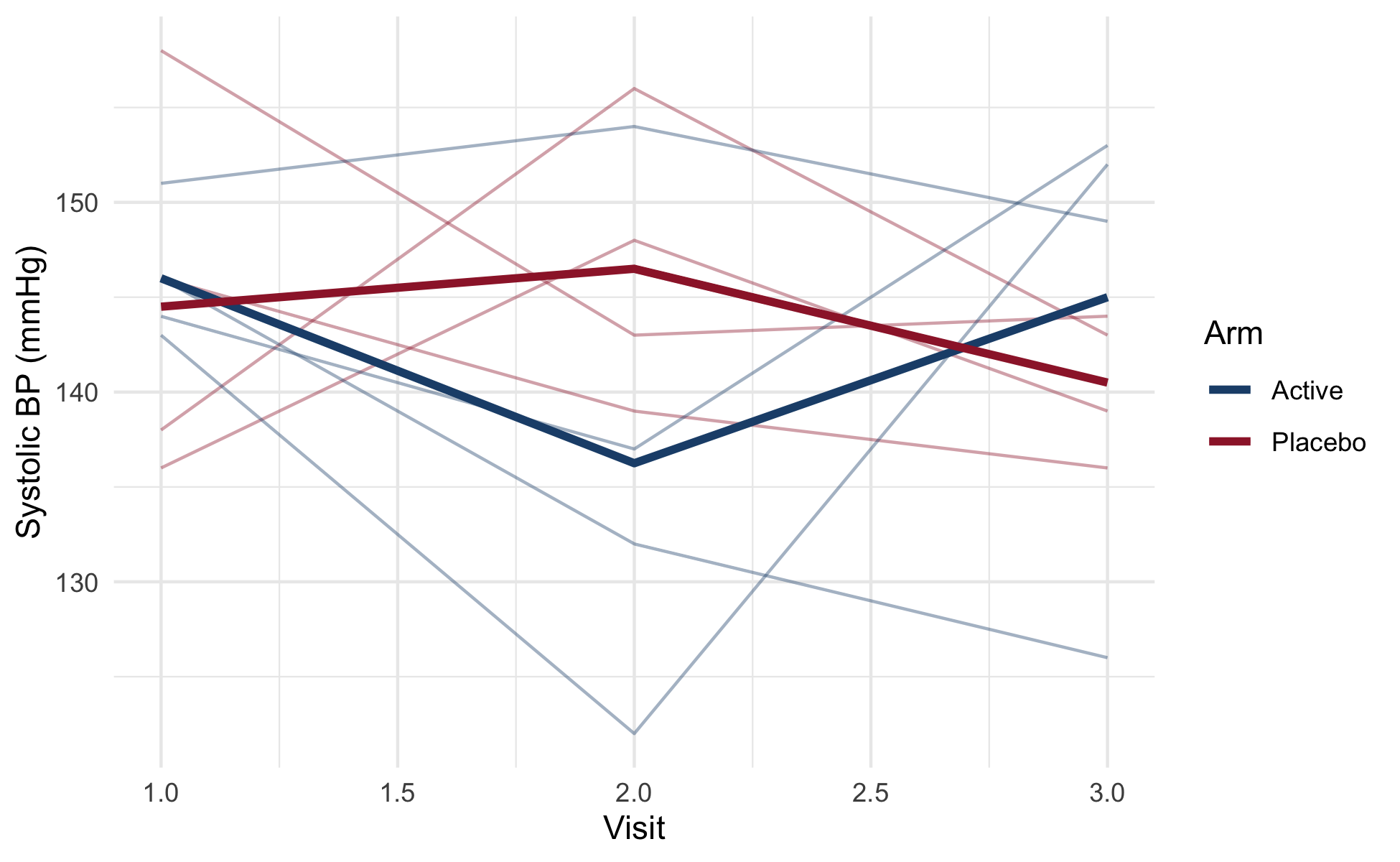
NoteCheck your understanding: when to pivot
Question. Your data has one row per patient with columns bp_baseline, bp_3mo, bp_6mo. You want to plot BP trajectory over time, faceted by treatment arm. Should you pivot to long format?
Answer.
Yes. ggplot2‘s grammar maps variables to aesthetics (x = time, y = bp, color = treatment). With the wide format, ’time’ is implicit in the column names and cannot be a single x-axis variable. Pivoting to long makes time an explicit column:
# the wide layout described in the question
wide <- tibble(
  patient_id  = sprintf("P%03d", 1:6),
  treatment   = rep(c("Placebo", "Active"), each = 3),
  bp_baseline = c(150, 148, 152, 149, 151, 147),
  bp_3mo      = c(147, 145, 150, 142, 143, 140),
  bp_6mo      = c(146, 144, 149, 137, 139, 135)
)

long <- wide |>
  pivot_longer(cols = starts_with("bp_"),
               names_to  = "time",
               names_prefix = "bp_",
               values_to = "bp") |>
  mutate(time = factor(time, levels = c("baseline", "3mo", "6mo")))

ggplot(long, aes(time, bp, group = patient_id)) +
  geom_line() +
  facet_wrap(~ treatment)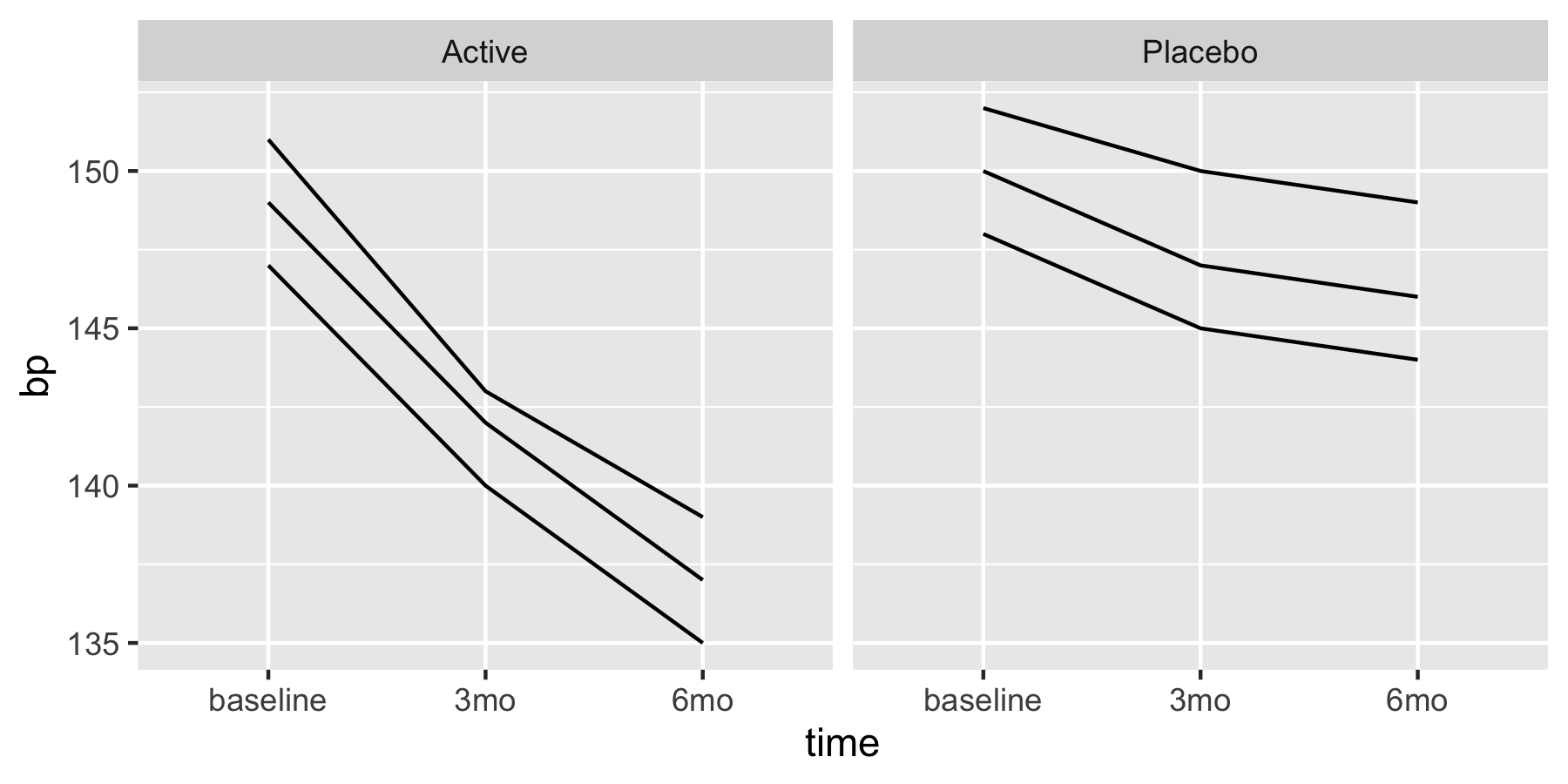
The pivot is the precondition for the plot. If instead you wanted to compute a within-patient change (‘bp_6mo - bp_baseline’), the wide format is preferable. The right shape depends on the operation.
18.9 janitor::clean_names()
Clinical CRF exports come with column names like Patient ID, Age (years), SBP at baseline (mmHg). These are unworkable in R: spaces, parentheses, units in names. janitor::clean_names() standardizes:
library(janitor)

# a CRF export as it usually arrives, with the header row
# written by whoever built the spreadsheet
crf <- data.frame(
  "Patient ID"             = "P001",
  "Age (years)"            = 64,
  "SBP at Baseline (mmHg)" = 148,
  check.names = FALSE
)
names(crf)
#> [1] "Patient ID"             "Age (years)"            "SBP at Baseline (mmHg)"

d <- clean_names(crf)
names(d)
#> [1] "patient_id"            "age_years"             "sbp_at_baseline_mm_hg"
Run on every dataset on arrival. Saves quoting and backtick-escaping for the rest of the project.
18.10 Dynamic column names
When you want to write functions that take column names as arguments, two idioms apply.
{ } (embrace) for bare names:
summarise_col <- function(df, col, fn = mean) {
  df |> summarize(result = fn({{ col }}, na.rm = TRUE))
}

summarise_col(penguins, body_mass_g, fn = median)
#> # A tibble: 1 × 1
#>   result
#>    <dbl>
#> 1   4050
.data[[name]] for character strings:
summarise_col_str <- function(df, col_name, fn = mean) {
  df |> summarize(result = fn(.data[[col_name]], na.rm = TRUE))
}

summarise_col_str(penguins, "body_mass_g", fn = median)
#> # A tibble: 1 × 1
#>   result
#>    <dbl>
#> 1   4050
The two approaches reflect different sources of the column name. Bare-name interface ({ }) is what most users expect; string interface (.data[[ ]]) is useful for programmatic generation of names.
rlang::sym() and !! are older patterns; { } is preferred in modern code.
18.11 Common antipatterns
Loop over rows:
R’s vectorized operations are 10–100× faster than row loops, and are usually clearer.
Hardcoded column indices:
df <- tibble(id = 1, age = 64, site = "A", sex = "F",
             visit = 1, arm = "Active", outcome = 12.4)

# bad: which columns are these? you have to go and count
df[, c(2, 4, 7)]
#> # A tibble: 1 × 3
#>     age sex   outcome
#>   <dbl> <chr>   <dbl>
#> 1    64 F        12.4

# good
df |> select(age, sex, outcome)
#> # A tibble: 1 × 3
#>     age sex   outcome
#>   <dbl> <chr>   <dbl>
#> 1    64 F        12.4
Indices break when columns are reordered or added; names are robust.
Manipulating raw data files:
library(readr)
out <- tempdir()                      # a real directory, for the example

# bad: flat CSV loses factor levels, dates, and attributes
write.csv(d, file.path(out, "data.csv"), row.names = FALSE)

# good: an .rds round-trips the object exactly
write_rds(d, file.path(out, "cleaned.rds"))
identical(d, read_rds(file.path(out, "cleaned.rds")))
#> [1] TRUE
Raw data should be read-only.
stringsAsFactors paranoia:
# unnecessary in R 4.0+: this is already the default
getOption("stringsAsFactors")
#> NULL
class(data.frame(x = "a")$x)
#> [1] "character"
The default changed in R 4.0; the option is no-op now.
18.12 Worked example: cohort cleanup
library(tidyverse)
library(janitor)

# A stand-in for the raw export, written to a temporary file so the
# whole pipeline below runs exactly as it would against a real one.
raw_path <- file.path(tempdir(), "visits.csv")
tibble(
  `Patient ID` = sprintf("P%03d", 1:6),
  Age          = c(17, 34, 52, 68, 71, 45),
  Outcome      = c(1, 0, 1, NA, 0, 1),
  Treatment    = rep(c("Placebo", "Active"), 3),
  Visit_Date   = "2026-03-01",
  bp_baseline  = c(150, 142, 138, 155, 147, 141),
  bp_6mo       = c(144, 139, NA, 148, 140, 136)
) |>
  write_csv(raw_path)

# read raw export
raw <- read_csv(raw_path, show_col_types = FALSE)

# clean names, restrict to adults, derive age groups
clean <- raw |>
  clean_names() |>
  filter(age >= 18, !is.na(outcome)) |>
  mutate(
    age_group = cut(age, breaks = c(18, 40, 65, Inf),
                    right = FALSE,
                    labels = c("18-39", "40-64", "65+")),
    visit_date = as.Date(visit_date)
  )

# pivot to long for repeated measures
long <- clean |>
  pivot_longer(
    cols      = starts_with("bp_"),
    names_to  = "visit",
    names_prefix = "bp_",
    values_to = "bp"
  ) |>
  filter(!is.na(bp))

# save the derived data
saveRDS(long, file.path(tempdir(), "visits_long.rds"))

head(long, 4)
#> # A tibble: 4 × 8
#>   patient_id   age outcome treatment visit_date age_group visit       bp
#>   <chr>      <dbl>   <dbl> <chr>     <date>     <fct>     <chr>    <dbl>
#> 1 P002          34       0 Active    2026-03-01 18-39     baseline   142
#> 2 P002          34       0 Active    2026-03-01 18-39     6mo        139
#> 3 P003          52       1 Placebo   2026-03-01 40-64     baseline   138
#> 4 P005          71       0 Placebo   2026-03-01 65+       baseline   147
The script is the audit trail: clean column names, filter inclusions documented as code, derived variables computed and named, output written to a non-raw location. A reviewer can read the script and recover exactly what cleaning happened.
One line in that script deserves a caveat, because cut() is the easiest thing in the chapter to write and the easiest to regret. Binning age into three groups is a legitimate display choice: a table of baseline characteristics is more readable by decade than by year. It is rarely a legitimate modeling choice. Categorizing a continuous predictor discards the within-category variation, assumes a step function where the biology is smooth, and makes the estimated effect depend on cutpoints that were chosen rather than measured. Harrell’s treatment of information loss (Harrell, 2025a, ch. 18) and the modeling argument in Regression Modeling Strategies (Harrell, 2015) are the standard statements of the cost. Keep the continuous variable in the data frame, derive the grouped version alongside it under its own name, as the script above does, and let the analysis chapter decide which one the model sees. Deriving age_group is cheap; recovering age after you have overwritten it is not.
18.13 Collaborating with an LLM on wrangling
LLMs handle dplyr/tidyr well; the trap is producing working code on the wrong data shape.
Prompt 1: tidying a dataset. Paste the column names and 5 rows of head, ask: ‘tidy this with pivot_longer. Show me the result.’
What to watch for. The LLM will produce code that runs. Whether it produces the correct tidy form depends on understanding the semantics of the columns (are bp_v1 and bp_v2 two visits of the same BP measurement, or are they different measurement types?).
Verification. Run the code; inspect the long form; check that one observation per row holds.
Prompt 2: writing a helper function with dynamic column names. Describe the function (takes a column name, applies a verb) and ask the LLM to use modern tidy-eval idioms.
What to watch for. { } for bare names, .data[[ ]] for strings, enquo/!! for backwards-compatible code. The LLM may use older patterns; modern is preferred.
Verification. Test the function with both bare names and strings to confirm it handles the input form you expect.
Prompt 3: cleaning column names. Paste a list of messy names and ask: ‘clean these names; explain the transformation rules.’
What to watch for. The LLM may apply a one-off transformation rather than recommending janitor::clean_names(). The package solution is better because it is consistent across all your files.
Verification. Compare the LLM output to janitor::clean_names()’s output on the same input.
18.14 Principle in use
Three habits keep a cleaning script auditable:
- Tidy data first. Wide-to-long when the analysis needs long; long-to-wide when it needs wide. Tidy is not the goal; correctness is. Tidy is usually the path to correctness.
- Keep raw data read-only. Cleaning scripts produce derived data; the raw file is sacrosanct.
-
Use
clean_names()on every read. The cost is one line; the benefit is the rest of the script becomes easier to write.
18.15 Exercises
- Using
palmerpenguins::penguins, compute the mean bill length for each species-island combination, dropping rows with missing bill length. Return a tidy tibble with columnsspecies,island,mean_bill,n. - Reshape a synthetic wide clinical dataset (one row per patient, columns
bp_v1,bp_v2,bp_v3) into long format with one row per patient-visit. - Write a function
summarise_col(df, col, fn)that acceptscolas a bare column name andfnas a function; apply it to the penguins data withcol = bill_length_mmandfn = median. - Using
case_when, derive a clinical classification variable from three or four continuous predictors. Verify the classification covers all rows (no NAs introduced unexpectedly).
On your own data. These have no answer key, because the answer depends on your data.
- Take a real CRF export from your own work (or simulate one) with messy column names and apply
janitor::clean_names(). Document any rename decisions you make manually beyond what janitor does.
18.16 Further reading
- (Wickham et al., 2023) Chapters 3–7, canonical applied wrangling introduction.
- (Wickham, 2014), the original Tidy Data paper; essential for the three rules.
- (Bryan & Stephens, 2019) Chapters 5–9, slower-paced alternative.
-
(Harrell, 2025b) Chapters 10–13, the same operations (manipulation, aggregation, merging, longitudinal reshaping) in the
data.tableidiom, read alongside Appendix A. -
(Harrell, 2025a) Chapter 18, ‘Information Loss’, on why the
cut()in the worked example belongs to the table and not to the model. - The
dplyrandtidyrcheat sheets atposit.co/resources/cheatsheets.
18.17 Prerequisites answers
- Tidy data satisfies three properties: each variable forms a column, each observation forms a row, and each type of observational unit forms a separate table. A typical wide clinical layout has one row per patient and one column per (variable, timepoint) pair, which violates the first two properties: ‘blood pressure at visit 2’ is not a variable, and one patient’s row contains many observations. Tidying makes group operations natural and prevents whole categories of bugs.
-
df |> filter(age >= 18) |> select(age, sex, outcome) |> group_by(sex) |> summarize(mean_outcome = mean(outcome, na.rm = TRUE)). The pipe-chained verbs read as a sequence of transformations. -
pivot_longer()reshapes from wide to long: columns become values in a new column. Use it when columns encode a variable (like visit number) that should be a row index. Usepivot_wider()when rows encode a variable that should be a column (e.g., computing a difference between two visit values). The right shape depends on the next operation.