Why might you save a figure as PDF rather than PNG for a journal submission, and when would you choose PNG instead?
22.2 Learning objectives
By the end of this chapter you should be able to:
Build publication-quality ggplot2 figures for continuous, categorical, and time-varying outcomes.
Generate many plots programmatically with purrr::map() over a list of groups.
Compose multi-panel figures with patchwork and arrange shared legends cleanly.
Produce PDF and PNG outputs at appropriate DPIs for journal and Word submissions.
Build a house theme via a theme_*() function and reuse it across all figures in a project.
Recognize when to reach for zzlongplot and zztable1 rather than rolling your own.
22.3 Orientation
A figure is the only part of a paper that most readers will examine closely. It is also the part over which the analyst has the most control and, unfortunately, exercises the least deliberation. The default output of a plotting call is a decision, made by somebody who never saw your data, about what the reader’s eye should be drawn to. Accepting it is also a decision.
A figure that survives peer review is one whose data, encoding, and aesthetic choices all serve the single claim the figure exists to make. This chapter is mostly about the mechanics of getting there, since the mechanics are what can be taught in a chapter; the fuller principles of effective visualization are taken up in the companion textbook (chapters 15–16 of Statistical Computing in the Age of AI), and the ways a figure can mislead without printing a false number are taken up later, in Chapter 34.
The combination ggplot2 + purrr + patchwork is the modern stack for going from a single exploratory plot to a polished multi-panel figure: ggplot2 for the plot, purrr for iteration over groups, patchwork for composition.
22.4 The statistician’s contribution
Software handles the mechanics; ggplot2 will draw whatever you specify. Whether what you specify communicates or misleads is not something it can check:
One plot, one message. A figure trying to convey three relationships succeeds at none. Three figures each conveying one are usually clearer. Resist the ‘pack everything into one figure to save space’ impulse.
Encode the claim, not the data. A scatter plot with 5,000 points obscures any pattern. The same relationship as a hex-binned plot or a 2D density contour shows the structure without the visual noise. Choose encoding for legibility, not faithfulness to the raw data.
Show the distribution, not a summary of it. A bar chart of group means with error bars is the default figure in the clinical literature and one of the least informative. It reports two numbers per group, hides skewness, bimodality, and outliers, and devotes most of its ink to a rectangle whose height is measured from an arbitrary zero. Harrell’s chapter on descriptive statistics and graphics (Harrell, 2025a, ch. 4) makes the case at length: a bar has a high ink-to-information ratio, its width carries no information at all, and graphing the raw data is usually essential rather than optional. With a modest number of observations per group, plot the points: geom_jitter() or ggbeeswarm::geom_quasirandom(), with the summary overlaid rather than substituted for the data. With many observations, geom_boxplot() or geom_violin() still shows a shape where a bar shows none. This is not in tension with the previous judgment: encoding the claim means choosing the display that makes the claim legible, and ‘the groups differ’ is a claim about distributions.
Consistency across the project. All figures in a paper should share fonts, color palette, and theme defaults. A house theme function applied via theme_set() makes consistency the default. Without it, ggplot2 produces nine variants of gray.
Display uncertainty. A point estimate without a CI invites over-trust. A regression line without a confidence band the same. The tools are simple (geom_errorbar, se = TRUE on geom_smooth); the discipline is the analyst’s.
Ask what the reader’s eye is measuring. A bar encodes length, so a truncated baseline makes a small difference fill the panel; a map encodes area, and land does not have a disease; a bubble’s radius is read as area, so a radius proportional to a count exaggerates it. None of these prints a false number, and all of them mislead. Chapter 34 returns to these failure modes and their remedies at length; the habit to carry into every figure is to name the visual channel the reader is decoding before choosing it.
These judgments are what make figures publishable.
22.5 One plot per group with purrr
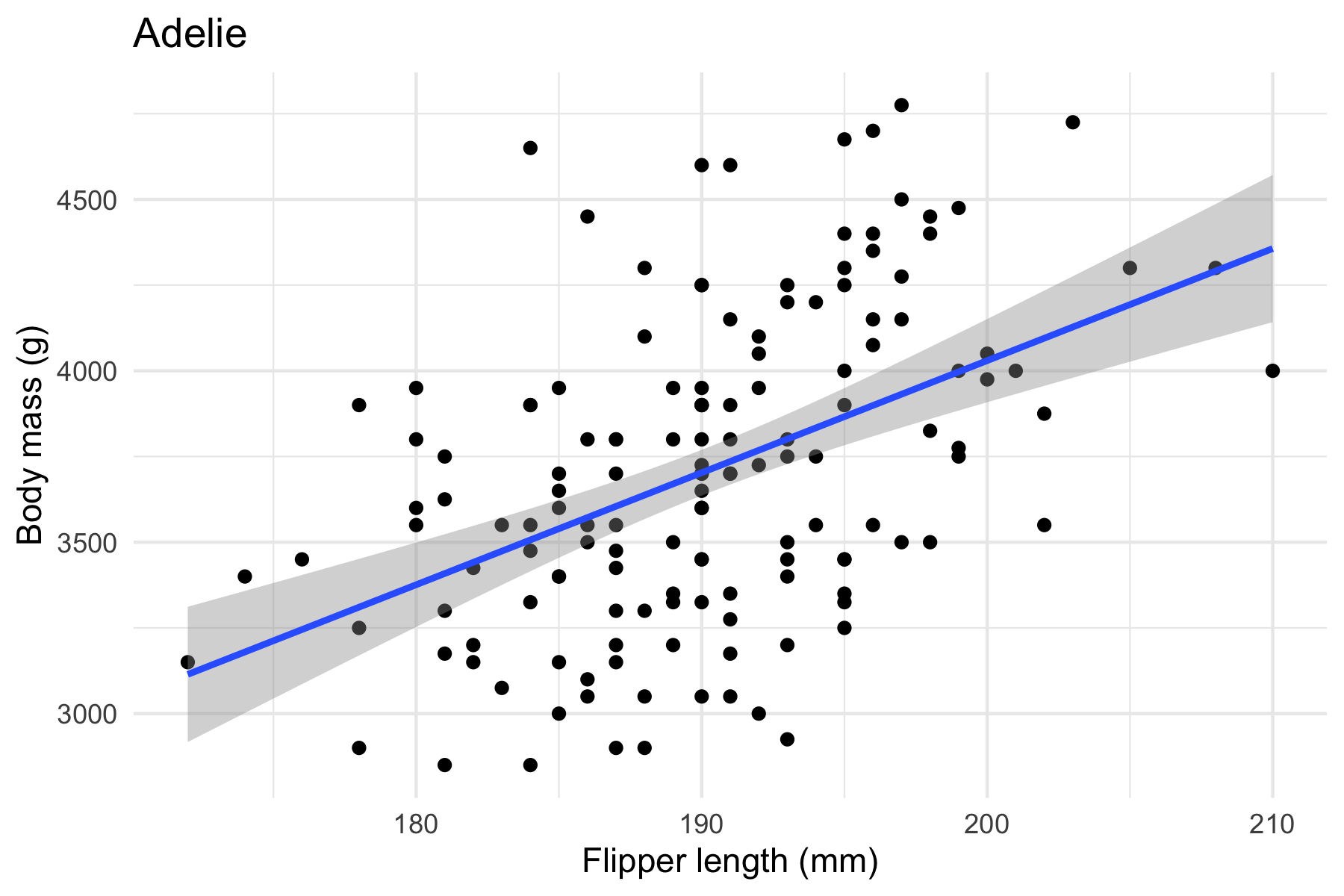
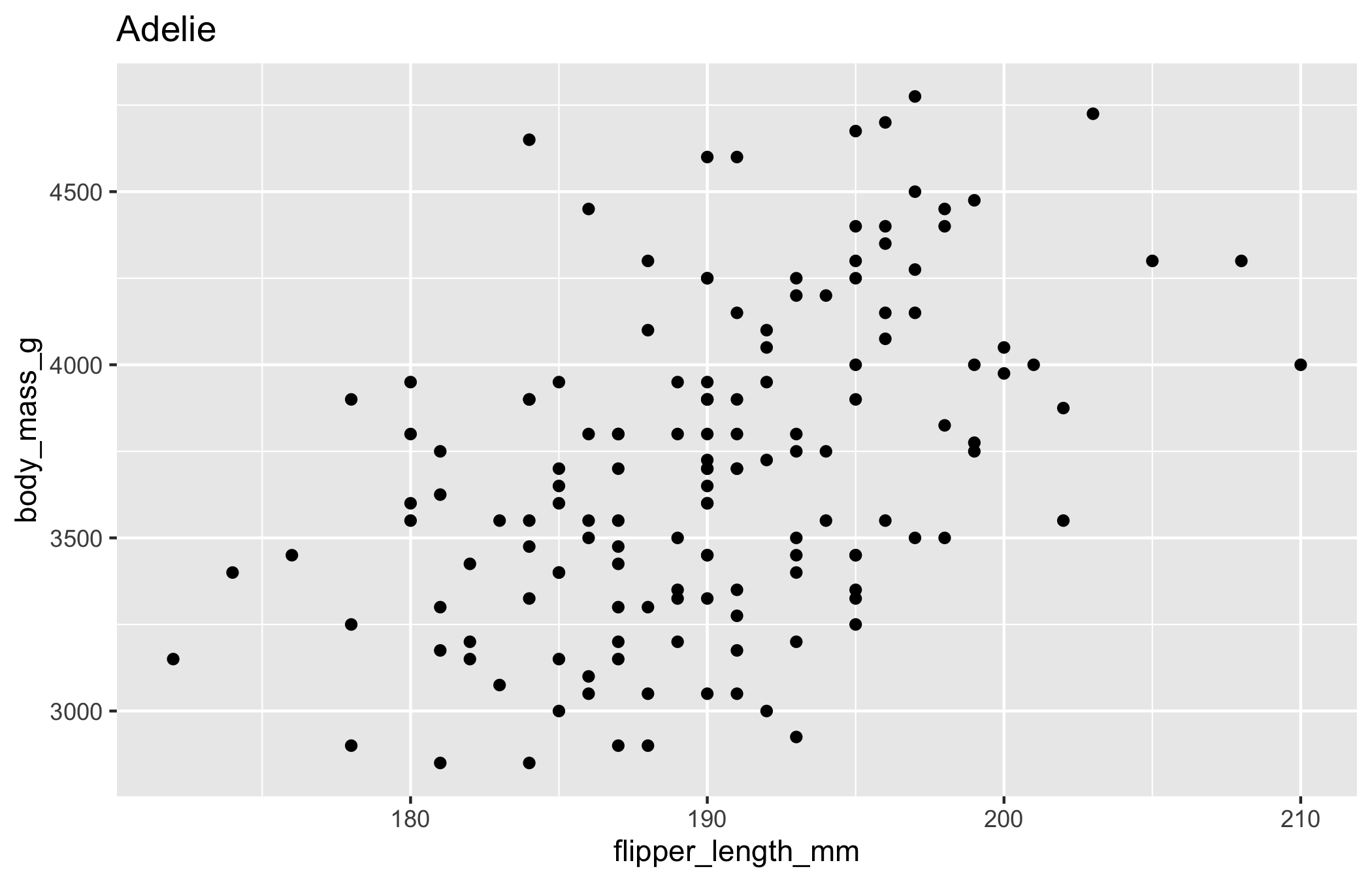
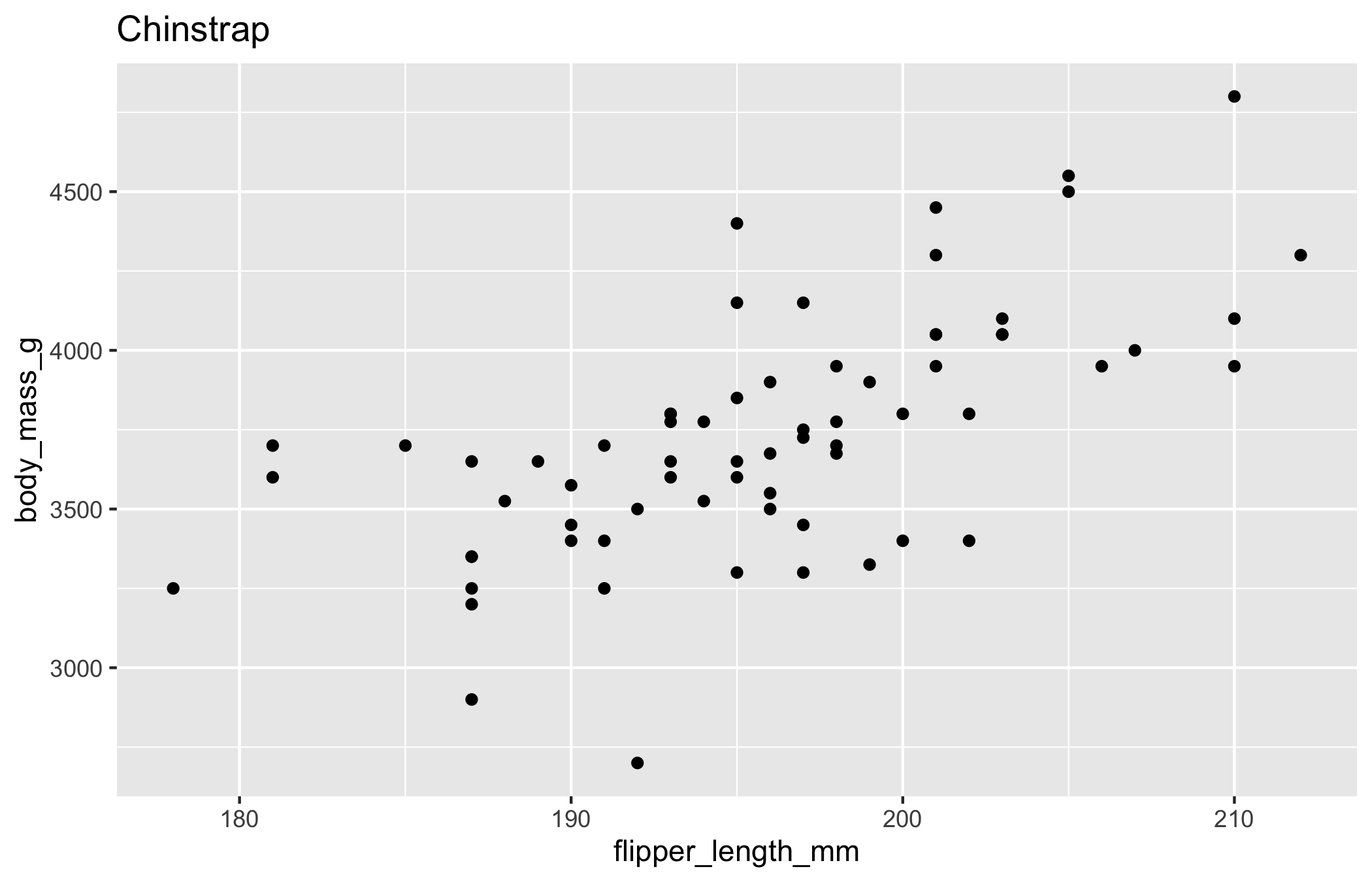
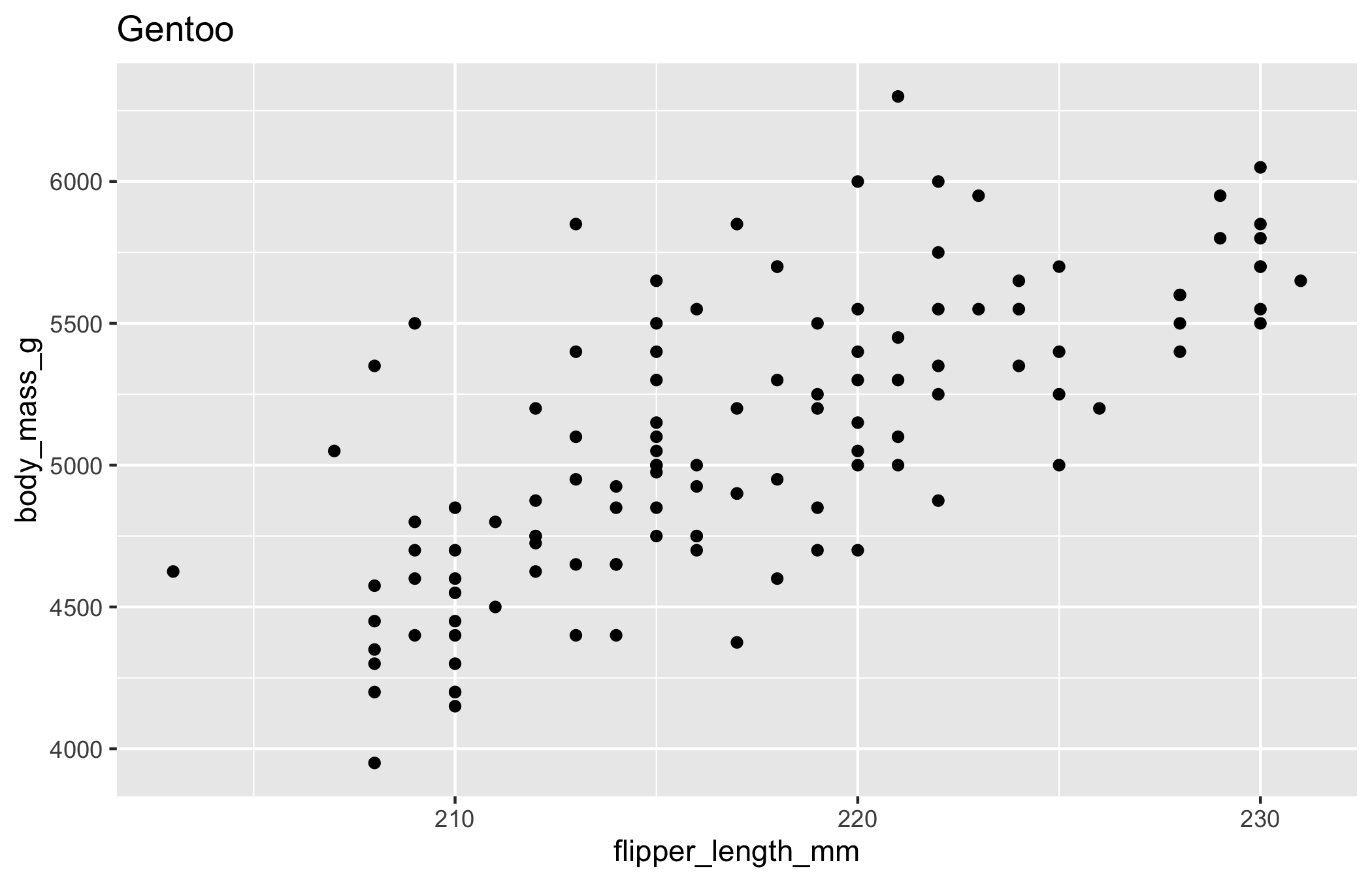
The pattern: split data by a grouping variable, apply a plotting function to each group, collect into a named list.
Figure 22.1: One plot per species, produced by mapping a plotting function over a split data frame. Only the Adelie panel is shown; plots holds all three.
The same iteration writes every panel to disk. This is a side effect, so we reach for walk2 rather than map2:
# save all three panels as publication-quality PDFswalk2(plots,paste0("figures/penguin-", names(plots), ".pdf"), \(p, path)ggsave(path, p, width =6, height =4))
Three things to internalize:
split() returns a named list. The names propagate through imap and walk2.
imap and walk2 use both the value and the name. Useful for titles, file paths, and identifying which plot is which.
walk2 for side effects. Returns invisibly; map2 would build a list of ggsave’s NULL returns.
# returns a list of plots, with the group keys in `k`
22.6 Multi-panel figures with patchwork
patchwork composes distinct plots into one figure. Where facet_wrap produces small multiples of the same plot, wrap_plots (or the + and / operators) combines independent plots that may differ in everything.
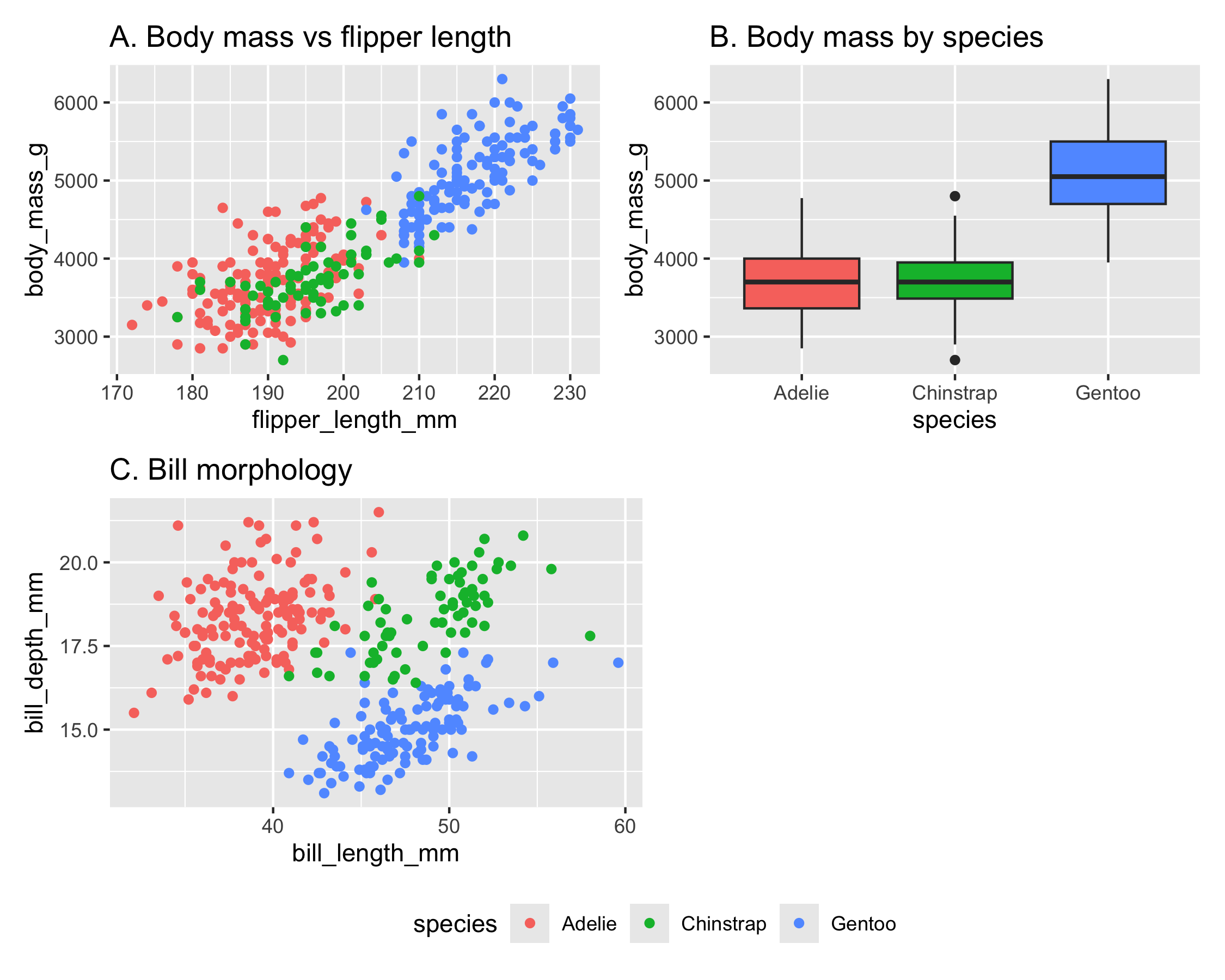
library(patchwork)p1<-ggplot(penguins_clean,aes(flipper_length_mm, body_mass_g, color =species))+geom_point()+labs(title ="A. Body mass vs flipper length")p2<-ggplot(penguins_clean,aes(species, body_mass_g, fill =species))+geom_boxplot()+labs(title ="B. Body mass by species")+guides(fill ="none")# hide redundant fill legendp3<-ggplot(penguins_clean,aes(bill_length_mm, bill_depth_mm, color =species))+geom_point()+labs(title ="C. Bill morphology")# 2x2 grid with shared legend at bottom(p1+p2)/(p3+plot_spacer())+plot_layout(guides ="collect")&theme(legend.position ="bottom")
Figure 22.2: Three distinct views of the penguin data composed into one figure with patchwork. The species legend is collected once and placed at the bottom.
Operators:
+ juxtaposes side by side.
/ stacks vertically.
| is equivalent to + (horizontal).
& applies a theme to every plot in the composition.
plot_layout(guides = "collect") collects duplicate legends into one.
For more control, plot_layout takes widths, heights, nrow, ncol, byrow, and other arguments.
facet_wrap for small multiples of the same plot; patchwork for distinct plots in one figure.
NoteCheck your understanding: facet vs. patchwork
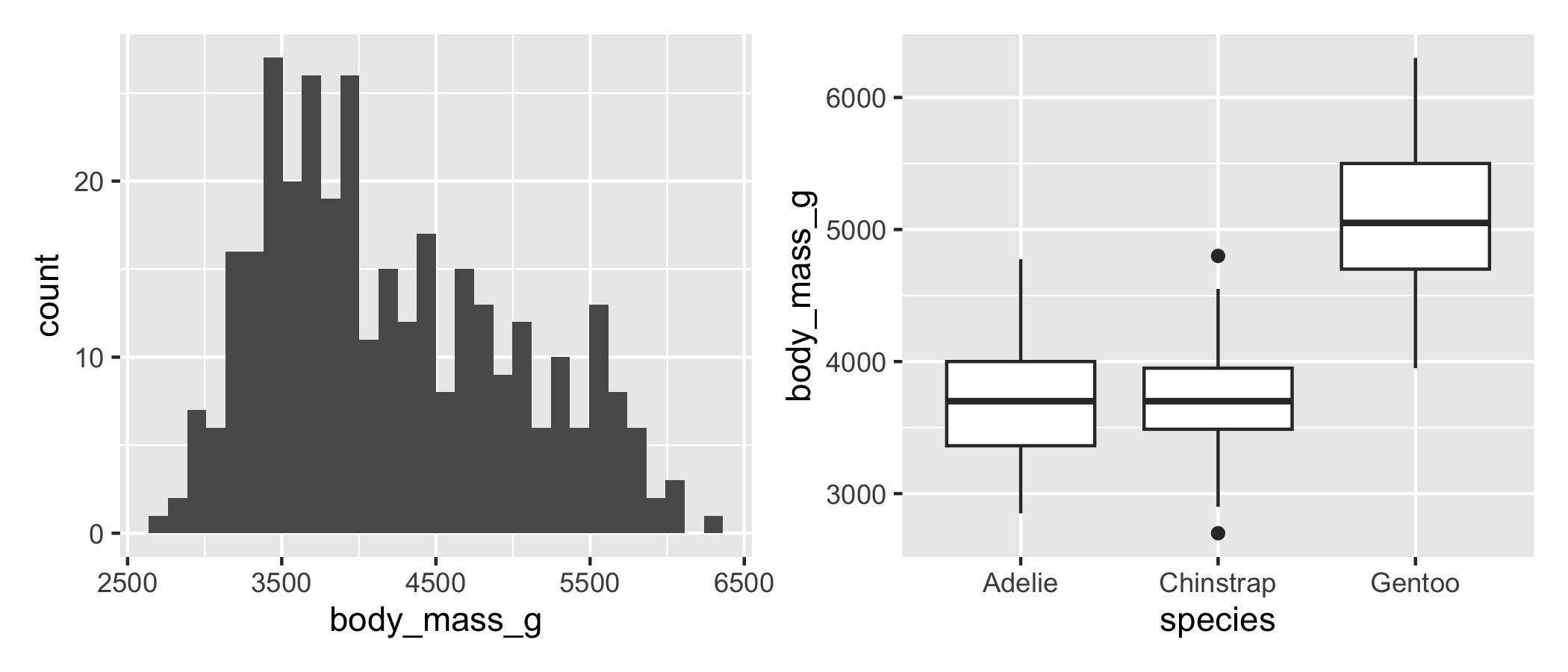
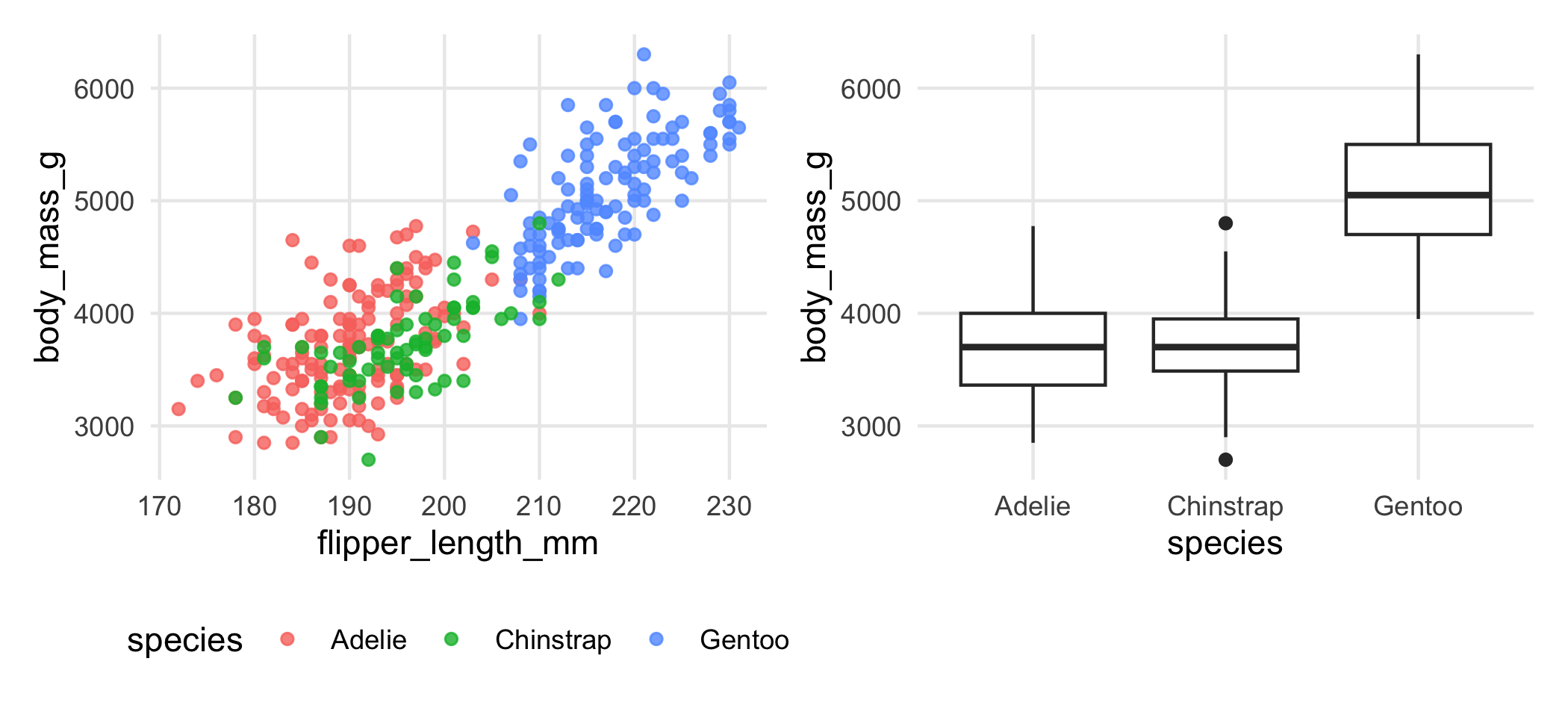
Question. You have one dataset and want to show ‘distribution of body mass’ as a histogram and ‘distribution of body mass by species’ as boxplots, side by side. Should you use facet_wrap, patchwork, or both?
Answer.
patchwork. The two panels show different views of the same data: a histogram (one geom) and boxplots (a different geom). facet_wrap shows the same plot across panels conditioned on a variable; both panels must use the same geom and aesthetic mapping. Build each plot separately and combine with p1 + p2.
Figure 22.3: The + operator places two plots side by side. A histogram of body mass and a boxplot of body mass by species, composed without either plot knowing about the other.
If the second plot was ‘histogram of body mass for each species’ (same geom, conditioned on species), facet_wrap(~species) would be the right tool.
22.7 House themes
A function that returns a theme() object, applied once per session:
For project consistency, define theme_practicum() in a setup chunk at the top of every analysis file, or in a project-level helper that gets sourced. Every plot then matches without per-plot theme calls.
For palettes, define and reuse:
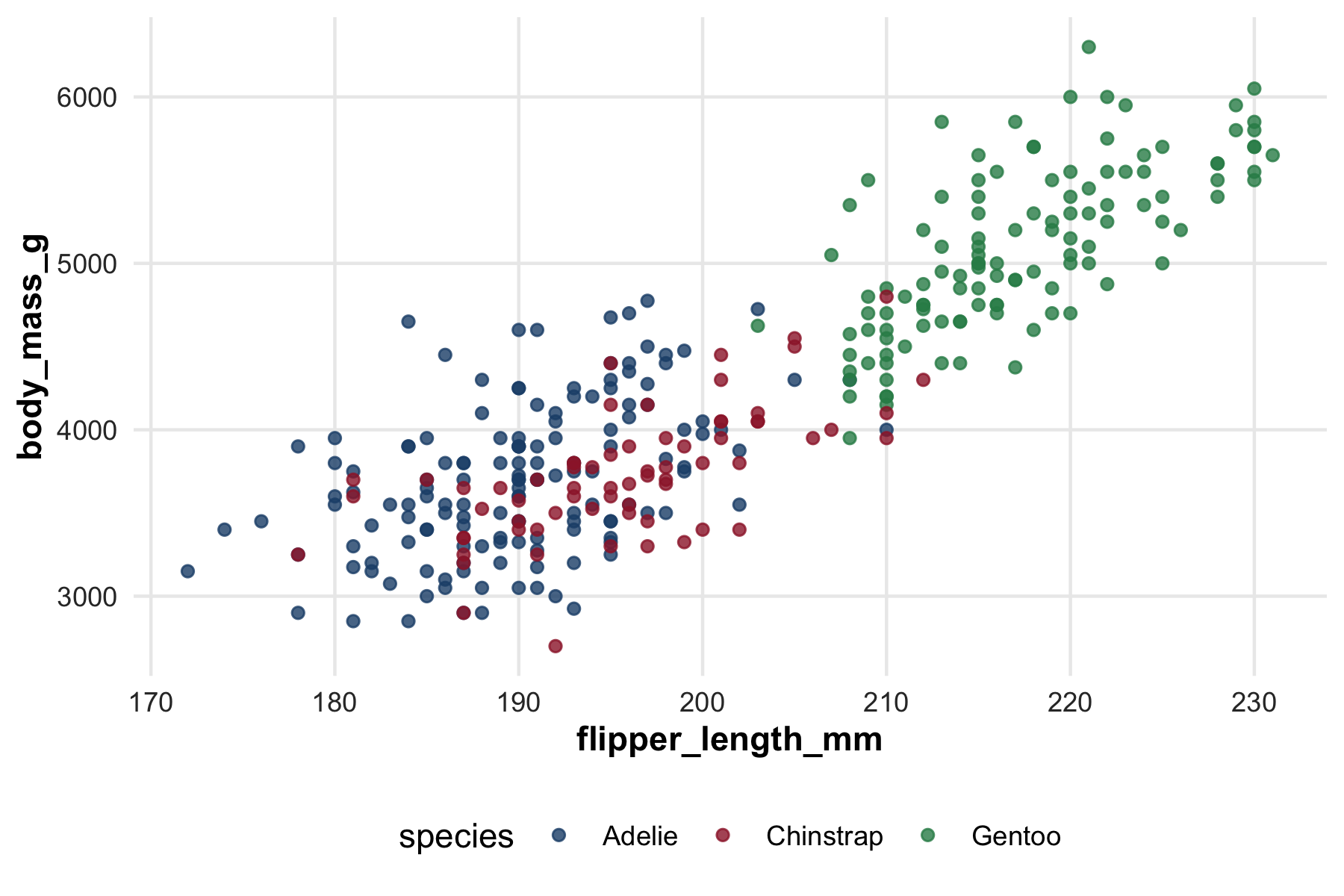
practicum_palette<-c("Adelie"="#1f4e79","Chinstrap"="#9d2235","Gentoo"="#2e8b57")scale_color_practicum<-function(...)scale_color_manual(values =practicum_palette, ...)# in plotsggplot(penguins_clean,aes(flipper_length_mm, body_mass_g, color =species))+geom_point(alpha =0.8)+scale_color_practicum()
Figure 22.4: A named palette applied through a house scale function. Naming the values by species rather than by position means the colors stay attached to the right group no matter how the data are subset or reordered.
For color-blind safety, verify the palette with the Coblis simulator (colorbrewer2.org/learnmore/colorblind-simulator.html) or colorBlindness::cvdPlot().
NoteCheck your understanding: why a theme function?
Question.theme_set(theme_practicum()) applies your house style once, at the top of the document, and every subsequent plot inherits it. Defining theme_practicum() and adding it to each plot means typing it repeatedly. Why would anyone prefer the repetition?
Answer.
Because theme_set() is invisible state, and invisible state is what makes a figure hard to reproduce.
A plot styled by theme_set() looks different depending on whether an earlier chunk ran. Lift that chunk into a different document, a slide deck, a colleague’s session, and it renders with ggplot2’s defaults instead. Nothing errors; the figure is simply not the one you approved. This is the same argument the book makes against a .Rprofile that attaches packages: code that only works because of something that happened earlier is code that travels badly.
Adding the theme explicitly makes each plot self-contained. It also makes opting out possible, which matters more than it sounds: a figure prepared to a journal’s specification needs to not carry your house style, and with theme_set() the only way to do that is to remember to reset it.
The cost is real, so the honest position is that theme_set() is fine in a self-contained analysis script and wrong in a book, a package, or anything whose chunks might be reordered or reused.
22.8 Export formats
ggsave() writes to many formats, picked by extension:
# vector for journal submissionggsave("figure1.pdf", plot =p, width =6, height =4, device =cairo_pdf)# raster for Word, slides, webggsave("figure1.png", plot =p, width =6, height =4, dpi =300)# vector for the web (preserves quality on zoom)ggsave("figure1.svg", plot =p, width =6, height =4)
DPI considerations:
72 DPI: web display only.
96 DPI: monitor default.
300 DPI: print quality (the standard for journal submission as PNG).
600 DPI: high-quality scientific figures.
For LaTeX submission, prefer PDF (vector). For Word, prefer PNG at 300 DPI. For web, SVG (vector).
device = cairo_pdf ensures non-default fonts are embedded so the PDF renders correctly on a system that lacks the font.
For journals, check size requirements (typically column widths of 85–90 mm or 170–180 mm) and produce figures at exactly the target size, not larger.
22.9 Integrating with zzlongplot and zztable1
The in-house zzlongplot package provides opinionated longitudinal-study plots: spaghetti plots with confidence ribbons, mean trajectories with group-specific overlays, ICC-aware error bars. The defaults match this practicum’s conventions.
library(zzlongplot)zzlongplot::lplot(adni_long, form =ADAS~VISIT|DX, cluster_var ="RID", xlab ="Visit", ylab ="ADAS-Cog")
When to reach for zzlongplot:
Longitudinal data with a standard time variable.
You want consistent styling with other figures in this practicum.
You do not want to write fifty lines of ggplot2 every time.
When to write your own ggplot2:
Custom encoding the package does not support.
Cross-sectional or non-longitudinal data.
You need a non-standard layout that fights the package’s defaults.
The zztable1 package similarly handles Table 1 generation; covered in the analysis-plan chapter (Chapter 24).
22.10 Worked example: regression diagnostic figure
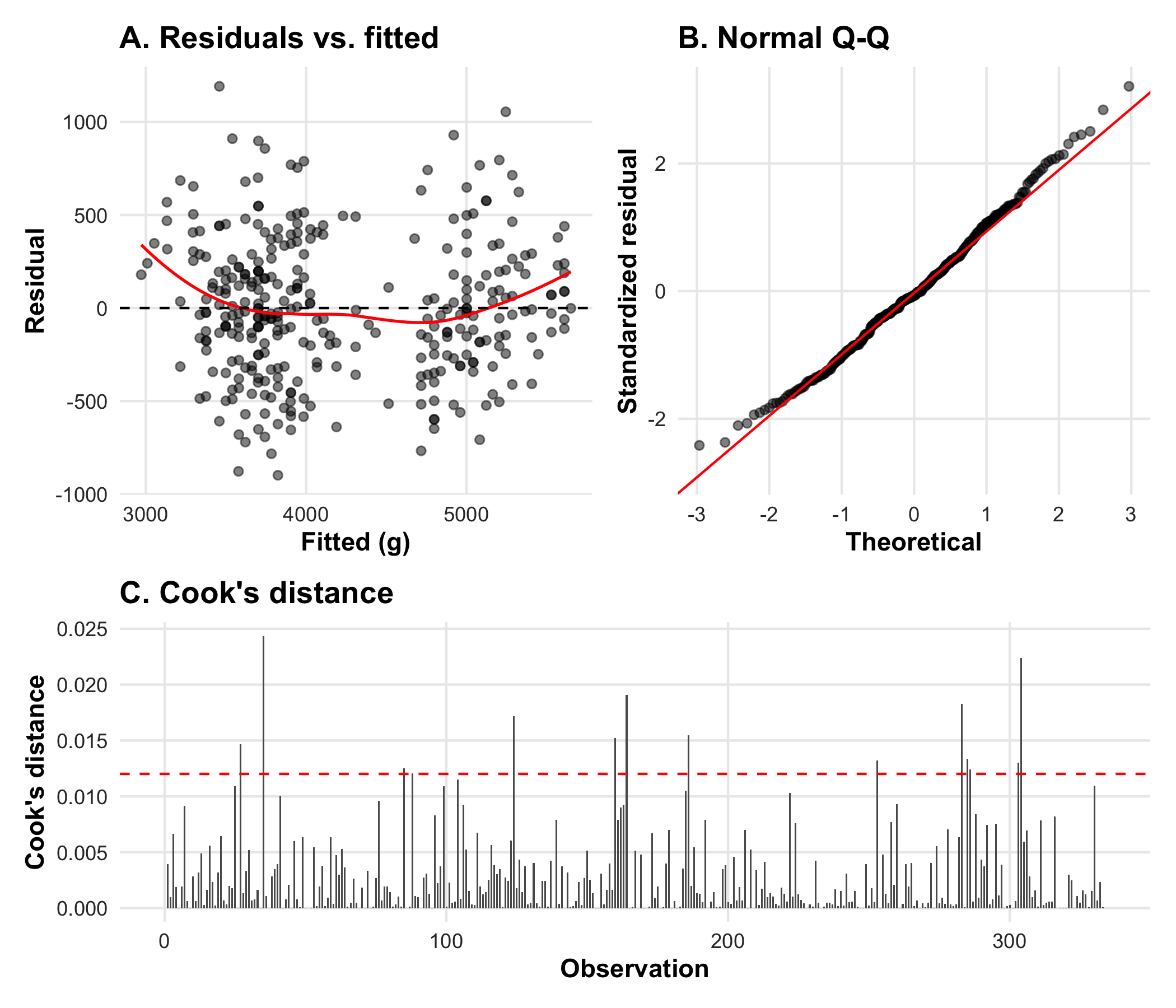
theme_set(theme_practicum())fit<-lm(body_mass_g~flipper_length_mm+species, data =na.omit(penguins))diag<-augment(fit)p_resid<-ggplot(diag, aes(.fitted, .resid))+geom_point(alpha =0.5)+geom_smooth(method ="loess", se =FALSE, color ="red", linewidth =0.6)+geom_hline(yintercept =0, linetype ="dashed")+labs(title ="A. Residuals vs. fitted", x ="Fitted (g)", y ="Residual")p_qq<-ggplot(diag, aes(sample =.std.resid))+geom_qq(alpha =0.5)+geom_qq_line(color ="red")+labs(title ="B. Normal Q-Q", x ="Theoretical", y ="Standardized residual")p_cook<-ggplot(diag, aes(seq_len(nrow(diag)), .cooksd))+geom_col(width =0.6)+geom_hline(yintercept =4/nrow(diag), linetype ="dashed", color ="red")+labs(title ="C. Cook's distance", x ="Observation", y ="Cook's distance")(p_resid+p_qq)/p_cook+plot_layout(heights =c(1, 0.7))
Figure 22.5: A composed regression-diagnostic figure: residuals versus fitted, a normal Q-Q plot, and Cook’s distance, all sharing the house theme.
To write the composed figure to disk for a manuscript, add a ggsave call after building it:
The composition reads naturally: top row two related diagnostics, bottom row a single observation-level diagnostic. House theme applied via theme_set(theme_practicum()). Saved as a publication-quality PDF.
22.11 Worked example: a longitudinal trajectory figure
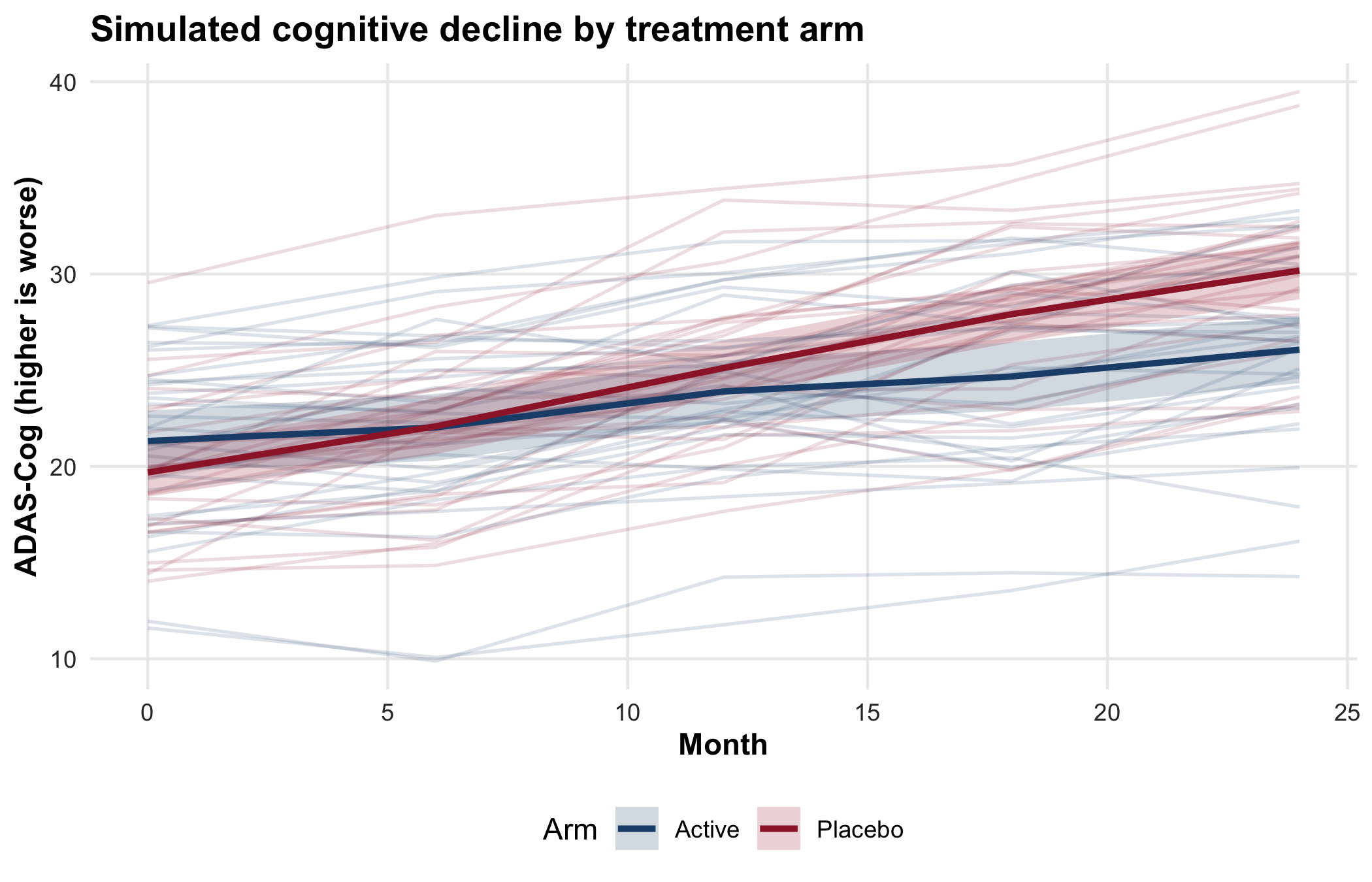
The penguin data are cross-sectional, and cross-sectional scatter plots are the easy case. The figure a biostatistician is asked for most often is harder: the trajectory of a repeated-measures outcome over time, by treatment arm, with the individual patients visible behind the group means. To illustrate, we simulate a small two-arm trial in which a cognitive score (higher is worse, in the manner of ADAS-Cog) declines more slowly on the active arm than on placebo.
set.seed(1)n_id<-60months<-c(0, 6, 12, 18, 24)sim<-expand_grid(id =seq_len(n_id), month =months)|>mutate(arm =if_else(id<=n_id/2, "Placebo", "Active"))|>group_by(id)|>mutate( slope =if_else(first(arm)=="Placebo", 0.45, 0.20)+rnorm(1, 0, 0.08), adas =20+rnorm(1, 0, 4)+slope*month+rnorm(n(), 0, 1.5))|>ungroup()arm_means<-sim|>group_by(arm, month)|>summarize(mean =mean(adas), se =sd(adas)/sqrt(n()), .groups ="drop")pal<-c(Placebo ="#9d2235", Active ="#1f4e79")ggplot(sim, aes(month, adas, color =arm))+geom_line(aes(group =id), alpha =0.15)+geom_ribbon(data =arm_means,aes(month, ymin =mean-1.96*se, ymax =mean+1.96*se, fill =arm), alpha =0.2, color =NA, inherit.aes =FALSE)+geom_line(data =arm_means, aes(month, mean, color =arm), linewidth =1.1, inherit.aes =FALSE)+scale_color_manual(values =pal)+scale_fill_manual(values =pal)+labs(x ="Month", y ="ADAS-Cog (higher is worse)", color ="Arm", fill ="Arm", title ="Simulated cognitive decline by treatment arm")
Figure 22.6: A longitudinal trajectory figure for a simulated two-arm trial. Thin lines are individual patients; heavy lines are arm means with a 95% confidence ribbon. This is the figure the in-house zzlongplot package produces by default.
The individual trajectories, drawn at low opacity, convey the within-arm heterogeneity that a plot of group means alone would hide. The confidence ribbon on the arm means keeps the reader from over-reading a separation that is within the noise. The real ADNI version of this figure appears in Chapter 31.
22.12 The same figure in Python
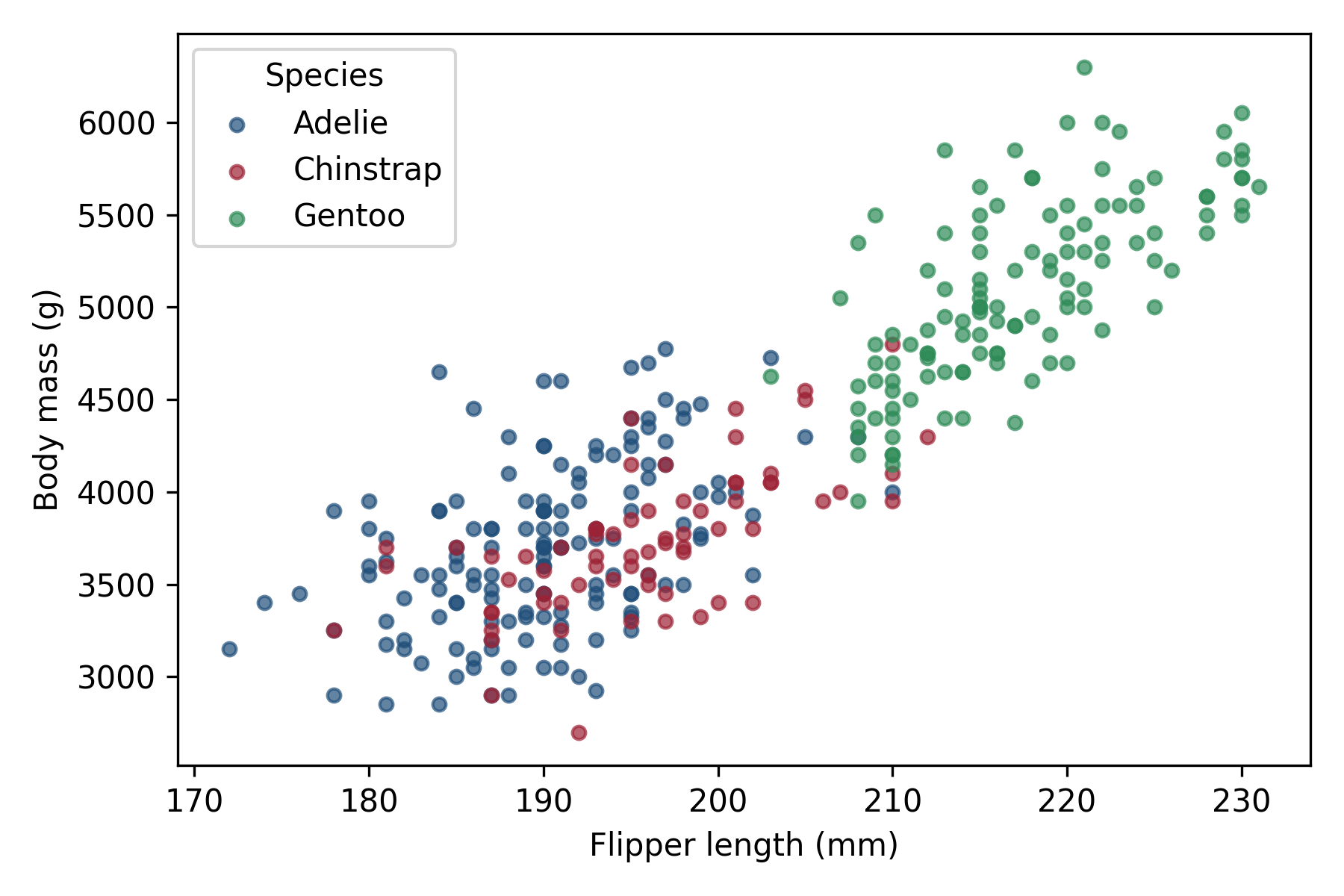
Many students arrive with more Python than R, and a good deal of collaborative biostatistics now crosses the two languages. Where a comparison is instructive we show the Python equivalent alongside the R. Quarto executes Python chunks through reticulate, and the r object makes an R data frame available to Python without writing an intermediate file. Here is the body-mass-versus-flipper-length scatter in pandas and matplotlib.
import matplotlibmatplotlib.use("Agg")import matplotlib.pyplot as pltdf = r.penguins_cleancolors = {"Adelie": "#1f4e79", "Chinstrap": "#9d2235","Gentoo": "#2e8b57"}fig, ax = plt.subplots(figsize=(6, 4))for species, sub in df.groupby("species", observed=True): ax.scatter(sub["flipper_length_mm"], sub["body_mass_g"], label=species, color=colors[species], alpha=0.7, s=18)ax.set_xlabel("Flipper length (mm)")ax.set_ylabel("Body mass (g)")ax.legend(title="Species")fig.tight_layout()plt.show()
Figure 22.7: The penguin scatter reproduced in Python. The cleaned R data frame crosses into Python through reticulate’s r object, so no intermediate file is written.
For a reader who wants the grammar of graphics in Python rather than the imperative matplotlib style, the plotnine package reproduces the ggplot2 API almost verbatim (from plotnine import ggplot, aes, geom_point). The choice between them is a matter of taste and of what the rest of the analysis is written in. The judgment the figure requires, one message per plot, uncertainty shown, color chosen for legibility, does not change with the language.
22.13 Collaborating with an LLM on graphics
LLMs handle ggplot well; the trap is busy plots that encode too much.
Prompt 1: drafting a plot. Describe the data and the question, ask: ‘write a ggplot that addresses the question. Use a color-blind-safe palette and clear axis labels with units.’
What to watch for. The default LLM plot tends to be busy: too many aesthetics encoded, default ggplot theme. Push for clarity. Multiple iterations of ‘simpler’ tend to improve.
Verification. Render the plot. Ask whether a reader who has never seen the data could state the message in one sentence.
Prompt 2: combining plots. Describe four plots, ask: ‘combine these into a 2x2 grid with shared legend, panel labels A through D.’
What to watch for.patchwork::plot_layout(guides = "collect") for the legend. Panel labels usually go in labs(title = "A. ...") rather than tag_levels. The LLM may use either; both work.
Verification. Render the combined plot. Are legends shared? Are panels labeled in the right order?
Prompt 3: theme function. Ask: ‘write a theme_practicum() function with serif body text, sans-serif axis labels, and a color-blind-safe default palette.’
What to watch for. The output is a starting point. Test with a few plots; iterate.
Verification. Apply to several plots; ensure consistency. Verify palette via Coblis or colorBlindness::cvdPlot().
22.14 Principle in use
Three habits carry from the first figure to the last:
One plot, one message. Resist combining relationships into one figure.
Set the theme once.theme_set(theme_practicum()) at the top of every analysis script.
Export for the destination. PDF for LaTeX, PNG at 300 DPI for Word, SVG for web. Embed fonts in PDFs.
22.15 Exercises
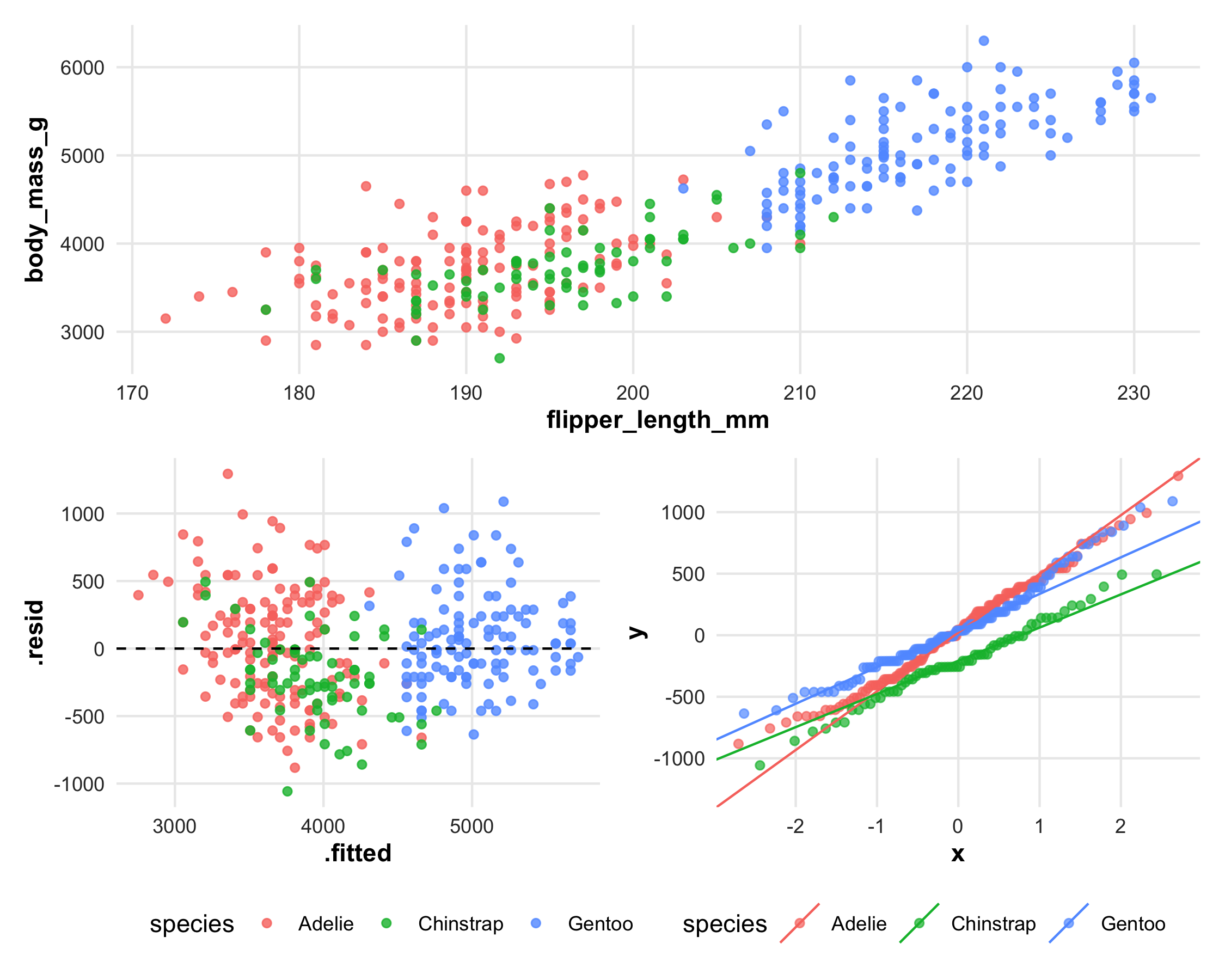
Using the palmerpenguins data, build a three-panel patchwork: (a) scatter of body mass vs flipper length colored by species; (b) residuals from a linear fit of (a); (c) QQ plot of residuals. Share the species legend across all three.
Write a function plot_per_site(data, site_col, outcome) that returns a named list of ggplot objects (one per site level) and a helper that saves each to figures/<site>.pdf.
Define theme_practicum() and apply it to three plots from any prior exercise. Verify the plots render consistently in HTML, PDF, and Word output.
On your own work. No answer key; these depend on material you supply.
Replicate one published figure from a recent biomedical paper using ggplot2. Compare your replication to the original; identify what is the same and what is different.
Verify your color palette with the Coblis simulator. Adjust if any pair of categories become indistinguishable under deuteranopia.
TipSolutions to exercises 1 to 3
1. A three-panel patchwork with one shared legend.
fit<-lm(body_mass_g~flipper_length_mm, data =penguins_clean)aug<-broom::augment(fit, data =penguins_clean)p_a<-ggplot(aug, aes(flipper_length_mm, body_mass_g, color =species))+geom_point(alpha =0.8)p_b<-ggplot(aug, aes(.fitted, .resid, color =species))+geom_point(alpha =0.8)+geom_hline(yintercept =0, linetype =2)p_c<-ggplot(aug, aes(sample =.resid, color =species))+stat_qq()+stat_qq_line()(p_a/(p_b|p_c))+plot_layout(guides ="collect")&theme(legend.position ="bottom")
Figure 22.8: Scatter, residuals, and a normal Q-Q plot of the same fit, composed with patchwork and sharing one species legend collected at the bottom.
plot_layout(guides = "collect") is what shares the legend, and the & operator applies the theme to every panel rather than only the last. Using + there is the usual mistake, and it silently themes one panel.
imap() rather than map() is what gives each plot its group name for the title. .data[[outcome]] takes the outcome as a string, which is the right choice when the caller is passing a variable name held in a variable.
Figure 22.9: One theme function applied to two different plots. Fonts, grid lines, and legend placement come from a single definition, so a change there propagates to every figure in the book.
Defining the theme as a function rather than calling theme_set() keeps it explicit at each use, which matters when a figure has to opt out. The cross-format verification the exercise asks for cannot be done from inside the book; render to each format and compare.
22.16 Further reading
(Wickham, 2016), ggplot2: Elegant Graphics for Data Analysis, the canonical reference.
(Wilke, 2019), Fundamentals of Data Visualization at clauswilke.com/dataviz, effective- visualization principles.
The patchwork, cowplot, and gganimate package vignettes.
(Harrell, 2025a) Chapter 4, on descriptive statistics and graphics, and (Harrell, 2024), whose reporting items include displaying raw data and avoiding bar charts of means.
(Harrell, 2025b) Chapter 14, a ggplot2 graphics chapter written for biomedical reporting, including interactive figures in Quarto output.
22.17 Prerequisites answers
Use split(data, data$group) |> map(\(d) ggplot(d, aes(x, y)) + geom_point()) to produce a named list of plots, one per group. Alternatively, in a tidyverse pipeline: data |> group_by(group) |> group_map(\(d, k) ggplot(d, aes(x, y)) + geom_point()) (note: group_map returns a list, with names taken from the group keys if you pass .keep = TRUE and post-process).
facet_wrap() splits a single plot into panels by a factor. Every panel shares the same aes mapping, same geom, same scales. patchwork::wrap_plots() composes distinct plots that can differ in every respect (different geoms, different data, different scales). Use facet_wrap() for small-multiples of the same plot; wrap_plots() for multi-panel figures showing different views.
PDF is a vector format: it scales cleanly, looks crisp at any zoom level, embeds fonts, and is what journal production systems prefer for typeset PDFs. PNG is raster: appropriate for embedding in Word documents, PowerPoint slides, or web pages where vector support is limited. Save PDF for LaTeX submissions, PNG at 300 DPI for Word and web.