flowchart LR
  R["Read<br/><i>character</i>"] --> C["Clean and recode<br/><i>character</i>"]
  C --> J["Join<br/><i>character</i>"]
  J --> X["<b>Convert here</b><br/><i>factor, reference level<br/>set deliberately</i>"]
  X --> M["Model<br/><i>factor</i>"]
  X --> P["Plot<br/><i>factor, ordered<br/>by fct_reorder</i>"]
19 Factors, Strings, and Dates
There are only two hard things in Computer Science: cache invalidation and naming things.
Phil Karlton, attributed (c. 1996)
NoteSources
Stat 545 Chapters 10–13 (Jenny Bryan, UBC); the forcats, stringr, and lubridate packages.
19.1 Prerequisites
Answer the following questions to see if you can bypass this chapter. You can find the answers at the end of the chapter in Section 19.16.
- Why has
stringsAsFactors = FALSEbeen the default since R 4.0, and what problems did the old default cause? - What does
stringr::str_detect()return, and how does it differ fromstringr::str_extract()? - Given
c('2026-04-23', '04/23/2026', 'April 23, 2026'), write onelubridate/readrpipeline that parses all three intoDateobjects.
19.2 Learning objectives
By the end of this chapter you should be able to:
- Manage factors idiomatically with
forcats(reorder, lump, relevel, drop, infreq). - Use
stringrverbs confidently for detection, extraction, replacement, splitting, and interpolation. - Parse dates robustly with
lubridate, including mixed formats and time zones. - Diagnose and fix the common ‘character vs. factor vs. ordered factor’ decision that causes modeling errors downstream.
- Recognize locale, time-zone, and Excel-date pitfalls.
19.3 Orientation
Numeric columns misbehave loudly. A value that should be a number and is not will stop the analysis, and the fix follows within the minute. Text, categories, and dates are the opposite case, and that is why they merit a chapter of their own. A date parsed under the wrong convention is still a date. A factor with an unintended reference level still fits. A string with trailing whitespace still joins, to nothing. Each of these produces a result rather than an error. Unfortunately, the result is wrong in a way that no amount of staring at the output will reveal, because the output looks exactly as it should.
We take up here the three packages that make these types tractable. Master them, and a large share of biomedical data cleaning becomes routine. More to the point, the failures that remain become the loud kind.
The packages are:
-
forcatsfor factors (categorical variables with defined levels). -
stringrfor character operations. -
lubridatefor dates and times.
All three are part of the tidyverse, with consistent naming and pipe-friendly interfaces.
19.4 The statistician’s contribution
The three packages are well documented and pleasant to use. The bugs they exist to prevent are not bugs of syntax. They are bugs of timing and assumption:
Factor or character? A character vector is flexible: any value, any order, any new level later. A factor is constrained: a fixed set of levels, a defined order, attached metadata. For analysis, factors are correct: the model needs to know the reference level and the level set. For data cleaning and joining, characters are usually safer (no surprises when a new value arrives). Convert to factor late, near the modeling step.
Reference levels matter. A logistic regression with factor treatment and reference ‘high-dose’ produces coefficients with a different interpretation from one with reference ‘placebo’. The default (alphabetical) is rarely what you want. Set the reference deliberately, in writing, in the data-cleaning script.
Time zones are tricky. A ‘date’ value ‘2026-04-23’ without a time zone is fine for daily-resolution analyses. A ‘time’ value ‘2026-04-23 02:00:00’ is ambiguous: which time zone? UTC? US/Pacific? The local time zone of the machine that recorded it? Time-zone errors propagate quietly through analyses; daylight- saving transitions cause spurious 1-hour gaps.
Excel dates. When data come from Excel, dates may arrive as 5-digit serial numbers (‘45405’) rather than date strings. Parsing them as dates produces nonsense (year 124, depending on the epoch convention). The fix is janitor::excel_numeric_to_date() or careful import. Verify any column whose name suggests dates but whose values are numeric.
These judgments are what distinguish a working data cleaning script from one that silently mishandles a common type.
The factor-or-character decision is not a matter of taste. Nor is it a decision made once. It is a decision about when in the pipeline the conversion happens, and Figure 19.1 gives the answer this chapter argues for.
19.5 Factors with forcats
The standard operations:
library(forcats)
library(dplyr)
library(palmerpenguins)

f <- factor(c("low", "high", "low", "medium", "high"))

# levels in current order
levels(f)
#> [1] "high"   "low"    "medium"
#> [1] "high"   "low"    "medium"

# alphabetical by default; reorder by frequency
fct_infreq(f)
#> [1] low    high   low    medium high
#> Levels: high low medium

# reorder by another variable
penguins |>
  mutate(species = fct_reorder(species, body_mass_g, mean,
                               .na_rm = TRUE))
#> # A tibble: 344 × 8
#>    species island    bill_length_mm bill_depth_mm flipper_length_mm body_mass_g
#>    <fct>   <fct>              <dbl>         <dbl>             <int>       <int>
#>  1 Adelie  Torgersen           39.1          18.7               181        3750
#>  2 Adelie  Torgersen           39.5          17.4               186        3800
#>  3 Adelie  Torgersen           40.3          18                 195        3250
#>  4 Adelie  Torgersen           NA            NA                  NA          NA
#>  5 Adelie  Torgersen           36.7          19.3               193        3450
#>  6 Adelie  Torgersen           39.3          20.6               190        3650
#>  7 Adelie  Torgersen           38.9          17.8               181        3625
#>  8 Adelie  Torgersen           39.2          19.6               195        4675
#>  9 Adelie  Torgersen           34.1          18.1               193        3475
#> 10 Adelie  Torgersen           42            20.2               190        4250
#> # ℹ 334 more rows
#> # ℹ 2 more variables: sex <fct>, year <int>

# specify order explicitly
fct_relevel(f, "low", "medium", "high")
#> [1] low    high   low    medium high
#> Levels: low medium high

# combine rare levels
fct_lump_n(f, n = 2)         # keep top 2; rest -> 'Other'
#> [1] low   high  low   Other high
#> Levels: high low Other
fct_lump_min(f, min = 5)     # keep levels with >= 5 obs
#> [1] Other Other Other Other Other
#> Levels: Other

# drop unused levels
fct_drop(f)
#> [1] low    high   low    medium high
#> Levels: high low medium

# rename levels
fct_recode(f, "L" = "low", "M" = "medium", "H" = "high")
#> [1] L H L M H
#> Levels: H L M
When to convert character to factor:
- Just before modeling: ensures the model knows the level set and the reference.
- Just before plotting: enables
fct_reorderfor ordered axis labels.
When to keep as character:
- During data cleaning: avoids ‘invalid factor level’ surprises when a new value arrives.
- For joining: factor matching can fail when levels differ between tables.
19.6 Strings with stringr
Pattern detection, extraction, replacement, and splitting:
library(stringr)

s <- c("ABC123", "ABC", "XYZ-789", NA)

# detect: returns logical
str_detect(s, "[0-9]")
#> [1]  TRUE FALSE  TRUE    NA
#> [1]  TRUE FALSE  TRUE  NA

# extract: returns first match per input, or NA
str_extract(s, "[0-9]+")
#> [1] "123" NA    "789" NA
#> [1] "123" NA    "789" NA

# extract all matches per input (returns list)
str_extract_all(s, "[0-9]+")
#> [[1]]
#> [1] "123"
#>
#> [[2]]
#> character(0)
#>
#> [[3]]
#> [1] "789"
#>
#> [[4]]
#> [1] NA

# replace
str_replace(s, "[0-9]+", "***")
#> [1] "ABC***"  "ABC"     "XYZ-***" NA

# split
str_split("a,b,c,d", ",", simplify = TRUE)
#>      [,1] [,2] [,3] [,4]
#> [1,] "a"  "b"  "c"  "d"
#>      [,1] [,2] [,3] [,4]
#> [1,] "a"  "b"  "c"  "d"

# interpolate
name <- "World"
str_glue("Hello, {name}!")
#> Hello, World!
#> Hello, World!

# case
str_to_lower("ABC")           # "abc"
#> [1] "abc"
str_to_upper("abc")           # "ABC"
#> [1] "ABC"
str_to_title("hello world")   # "Hello World"
#> [1] "Hello World"

# trim whitespace
str_trim("  abc  ")           # "abc"
#> [1] "abc"
str_squish("  a   b   c  ")   # "a b c"
#> [1] "a b c"
The regex fundamentals you need:
-
[abc]: any of a, b, c. -
[a-z],[A-Z],[0-9]: ranges. -
\\d,\\w,\\s: digit, word char, whitespace. -
*,+,?: zero-or-more, one-or-more, zero-or-one. -
{n},{n,m}: exactly n, between n and m. -
^,$: start, end of string. -
(): capture group;(?:...)non-capturing. -
|: alternation. -
\\: escape; in R strings this is\\\\for a literal backslash.
For complex regex, build incrementally and test each step.
19.7 Dates with lubridate
Parsing:
library(lubridate)

# fixed format
ymd("2026-04-23")
#> [1] "2026-04-23"
mdy("4/23/2026")
#> [1] "2026-04-23"
dmy("23 April 2026")
#> [1] "2026-04-23"

# mixed formats: try each
parse_date_time(c("2026-04-23", "04/23/2026", "April 23, 2026"),
                orders = c("ymd", "mdy", "Bdy"))
#> [1] "2026-04-23 UTC" "2026-04-23 UTC" "2026-04-23 UTC"
#> [1] "2026-04-23" "2026-04-23" "2026-04-23"

# date-time
ymd_hms("2026-04-23 14:30:00")
#> [1] "2026-04-23 14:30:00 UTC"
ymd_hm("2026-04-23 14:30")
#> [1] "2026-04-23 14:30:00 UTC"
Components:
Arithmetic:
d + days(7)              # 2026-04-30
#> [1] "2026-04-30"
d %m+% months(3)         # 2026-07-23 (handles month length safely)
#> [1] "2026-07-23"

# differences
ymd("2026-12-31") - ymd("2026-01-01")  # Time difference of 364 days
#> Time difference of 364 days
as.numeric(ymd("2026-12-31") - ymd("2026-01-01"), units = "days")
#> [1] 364
Time zones:
# parse as a specific time zone
t <- ymd_hms("2026-04-23 14:30:00", tz = "America/Los_Angeles")
t
#> [1] "2026-04-23 14:30:00 PDT"

# convert
with_tz(t, "UTC")          # same instant, different zone
#> [1] "2026-04-23 21:30:00 UTC"
force_tz(t, "UTC")         # same wall clock, different zone
#> [1] "2026-04-23 14:30:00 UTC"
with_tz changes the displayed zone without changing the instant; force_tz changes the instant by declaring the wall clock was always in the new zone. Confusing them is a common source of 1- to 24-hour errors.
19.8 A runnable example: parsing a messy clinical field
The three tools of this chapter earn their place on the free-text fields that clinical data are full of. To illustrate, consider a single column recording a dosing instruction as the site typed it, with the drug, the amount, and the start date all run together and formatted inconsistently. We use a regular expression to pull out the structured pieces, and lubridate to parse the dates, which arrive in three different formats.
reticulate::py_require("pandas")
library(tidyverse)

dosing <- tibble(
  raw = c("Metformin 500mg started 2026-01-14",
          "Lisinopril 10 mg started 01/22/2026",
          "Atorvastatin 20mg started Feb 3 2026",
          "Aspirin 81 mg started 2026-02-19")
)

parsed <- dosing |>
  mutate(
    drug   = str_extract(raw, "^[A-Za-z]+"),
    dose   = as.integer(str_extract(raw, "\\d+(?=\\s?mg)")),
    date_s = str_extract(raw, "(?<=started ).*$"),
    start  = parse_date_time(date_s, orders = c("ymd", "mdy", "bdy")) |>
             as_date()
  ) |>
  select(drug, dose, start)

parsed
#> # A tibble: 4 × 3
#>   drug          dose start
#>   <chr>        <int> <date>
#> 1 Metformin      500 2026-01-14
#> 2 Lisinopril      10 2026-01-22
#> 3 Atorvastatin    20 2026-02-03
#> 4 Aspirin         81 2026-02-19
Three regular-expression constructs do the work. The anchor ^[A-Za-z]+ takes the leading word, the drug. The lookahead \\d+(?=\\s?mg) takes the digits that precede mg without capturing the mg itself. The lookbehind (?<=started ) takes everything after the word started, which is the date in whatever format the site used. parse_date_time then tries each candidate format in turn. The result is a tidy three-column table drawn from a single messy string.
19.8.1 The same parsing in Python
pandas exposes the same operations through its .str accessor and to_datetime. The regular expressions are identical, because the regex dialect is shared. Only the surrounding idiom differs.
import pandas as pd

dosing = r.dosing            # the R tibble, via reticulate

out = pd.DataFrame({
    "drug": dosing["raw"].str.extract(r"^([A-Za-z]+)")[0],
    "dose": dosing["raw"].str.extract(r"(\d+)\s?mg")[0].astype(int),
    "start": pd.to_datetime(
        dosing["raw"].str.extract(r"started (.*)$")[0],
        format="mixed"),
})
out
#>            drug  dose      start
#> 0     Metformin   500 2026-01-14
#> 1    Lisinopril    10 2026-01-22
#> 2  Atorvastatin    20 2026-02-03
#> 3       Aspirin    81 2026-02-19
The format="mixed" argument is pandas’ counterpart to supplying several orders to parse_date_time. It lets each value be parsed by whichever format fits. The lesson is that regex and date parsing are portable skills. The drug, dose, and date fall out the same way in either language, and a biostatistician who knows the constructs can work in whichever the project uses.
19.9 Common pitfalls
Excel dates as serial numbers. A date column from Excel may arrive as 45405 (= 2024-04-23 in Excel’s 1900-epoch numbering). Parse with:
janitor::excel_numeric_to_date(45405)
#> [1] "2024-04-23"
#> [1] "2024-04-23"
Verify: any ‘date’ column whose values are 5-digit numbers should ring an alarm.
Mixed-locale month names. lubridate::dmy() can read ‘avril’ (French April) only if the locale supports it. For multi-language data:
lct <- Sys.getlocale("LC_TIME")
Sys.setlocale("LC_TIME", "fr_FR.UTF-8")
dmy("23 avril 2026")
Sys.setlocale("LC_TIME", lct)             # restore
Or use explicit format strings.
Time-zone-naïve datetimes. A datetime read without a time zone defaults to UTC (lubridate) or the system zone (base R). Be explicit; never assume.
Daylight-saving transitions. Adding 24 hours and adding 1 day are not always the same:
The first is a calendar day. The second is 24 wall-clock hours, which crosses a DST boundary. Use whichever notion of a day is appropriate for the analysis at hand.
19.10 Common antipatterns
Hand-coded ifelse chains for date parsing:
Letting characters become factors silently in old code:
Comparing factors by value when levels differ:
f1 <- factor("a", levels = c("a", "b"))
f2 <- factor("a", levels = c("a", "c"))
f1 == f2                          # works, but levels differ
#> [1] TRUE
# better: convert to character for cross-table comparisons
as.character(f1) == as.character(f2)
#> [1] TRUE
19.11 Worked example: cleaning a CRF export
library(tidyverse)
library(janitor)
library(lubridate)
library(forcats)

# A stand-in for the messy export: mixed date formats, one Excel
# serial date, inconsistent treatment spellings, a rare site that
# should be lumped, and blank sex entries. Twenty-four rows, so that
# fct_lump_min's threshold of 10 has something to bite on.
crf_path <- file.path(tempdir(), "crf_export.csv")
set.seed(3)
tibble(
  `Visit Date`       = rep(c("2026-01-14", "02/19/2026",
                             NA, "2026-03-02"), 6),
  `Visit Date Excel` = rep(c(NA, NA, 45405, NA), 6),
  Treatment          = rep(c("placebo", "PBO",
                             "low dose", "HIGH DOSE"), 6),
  Site               = c(rep("A", 12), rep("B", 10), "Y", "Z"),
  Sex                = rep(c("F", "M", "", "F"), 6)
) |>
  write_csv(crf_path, na = "")

# na = "NA" keeps blank Sex as an empty string rather than NA, which
# is what the fct_recode below is there to handle.
raw <- read_csv(crf_path, na = "NA", show_col_types = FALSE)

clean <- raw |>
  clean_names() |>
  mutate(
    # parse mixed-format date column
    visit_date = parse_date_time(visit_date,
                                 orders = c("ymd", "mdy")),

    # convert numeric Excel dates if any
    visit_date = if_else(is.na(visit_date) & !is.na(visit_date_excel),
                         excel_numeric_to_date(visit_date_excel),
                         visit_date),

    # standardize treatment text
    treatment = str_to_title(treatment),
    treatment = str_replace(treatment, "^Pbo$", "Placebo"),

    # convert to factor with deliberate reference
    treatment = factor(treatment,
                       levels = c("Placebo", "Low Dose", "High Dose")),

    # collapse small categories
    site = fct_lump_min(site, min = 10, other_level = "Other"),

    # recode missing-as-unknown
    sex = fct_recode(factor(sex), "Unknown" = "")
  ) |>
  filter(!is.na(visit_date), !is.na(treatment))

count(clean, treatment, site, sex)
#> # A tibble: 10 × 4
#>    treatment site  sex         n
#>    <fct>     <fct> <fct>   <int>
#>  1 Placebo   A     F           3
#>  2 Placebo   A     M           3
#>  3 Placebo   B     F           3
#>  4 Placebo   B     M           3
#>  5 Low Dose  A     Unknown     3
#>  6 Low Dose  B     Unknown     2
#>  7 Low Dose  Other Unknown     1
#>  8 High Dose A     F           3
#>  9 High Dose B     F           2
#> 10 High Dose Other F           1
The cleaned data have dates parsed from mixed formats, treatment standardized and explicitly factored, small sites collapsed, and missing sex coded explicitly. That is, the script documents every transformation as code, rather than leaving it to memory.
19.12 Collaborating with an LLM on types
LLMs handle these packages well. The trap, as far as we have observed, is silent type coercion.
Prompt 1: parsing dates. Paste a sample of date strings (10 examples covering the formats present) and ask: ‘parse these robustly, flagging any that fail.’
What to watch for. parse_date_time() with multiple orders is the canonical answer. If the LLM produces nested ifelse or case_when, push back.
Verification. Run on the full column. Count NAs produced; investigate any unexpected ones.
Prompt 2: regex extraction. Describe the pattern you want and provide examples. Ask the LLM to write a regex.
What to watch for. Test the regex on edge cases the LLM may not have considered (empty strings, unusual separators, mixed case). LLM regexes often fail at the margins.
Verification. str_detect and str_extract on a test set; count mismatches.
Prompt 3: factor reference level. Paste a modeling formula and ask: ‘is the default reference level for treatment clinically sensible? If not, how should it be set?’
What to watch for. The LLM should know that alphabetical reference is rarely what you want. Specifying via factor(..., levels = ...) or fct_relevel is the canonical fix.
Verification. Re-fit the model with the explicit reference; check coefficients match the intended interpretation.
19.13 Principle in use
Three habits keep text, categories, and dates from becoming entries on the project’s bug list:
- Convert to factor late. Cleaning in character; modeling in factor. Specify reference levels deliberately.
-
Parse dates with named formats.
parse_date_timewith explicit orders, not guesses. Watch for Excel serial numbers. - Be explicit about time zones. A datetime without a zone is a bug waiting to happen.
19.14 Exercises
- Using
palmerpenguins::penguins, reorder thespeciesfactor by mean body mass (ascending) usingfct_reorder(). Produce a bar plot that reflects the new order. - A character column contains hospital names like
'General Hospital Main Campus','Gen. Hospital','GENHOSP'. Write a regex-based cleaning pipeline that collapses these into a single canonical level. - A dataset has a
visit_datecolumn in mixed formats. Write a pipeline that parses everything withparse_date_time()and flags rows that fail to parse. - Write a function that takes any character column and returns a tibble of value, count, and proportion.
- Create a dataset with a datetime in PST and convert it to UTC two ways: with
with_tzandforce_tz. Explain the difference.
On your own data. No answer key; the answer depends on your data.
- Use the function from exercise 4 to audit the categorical variables in a recent analysis of yours. Report any level you did not expect.
TipSolutions to exercises 1 to 5
1. Reorder a factor by a summary of another variable.
library(ggplot2)

penguins |>
  filter(!is.na(body_mass_g)) |>
  mutate(species = fct_reorder(species, body_mass_g, mean)) |>
  ggplot(aes(species, body_mass_g)) +
  stat_summary(fun = mean, geom = "col")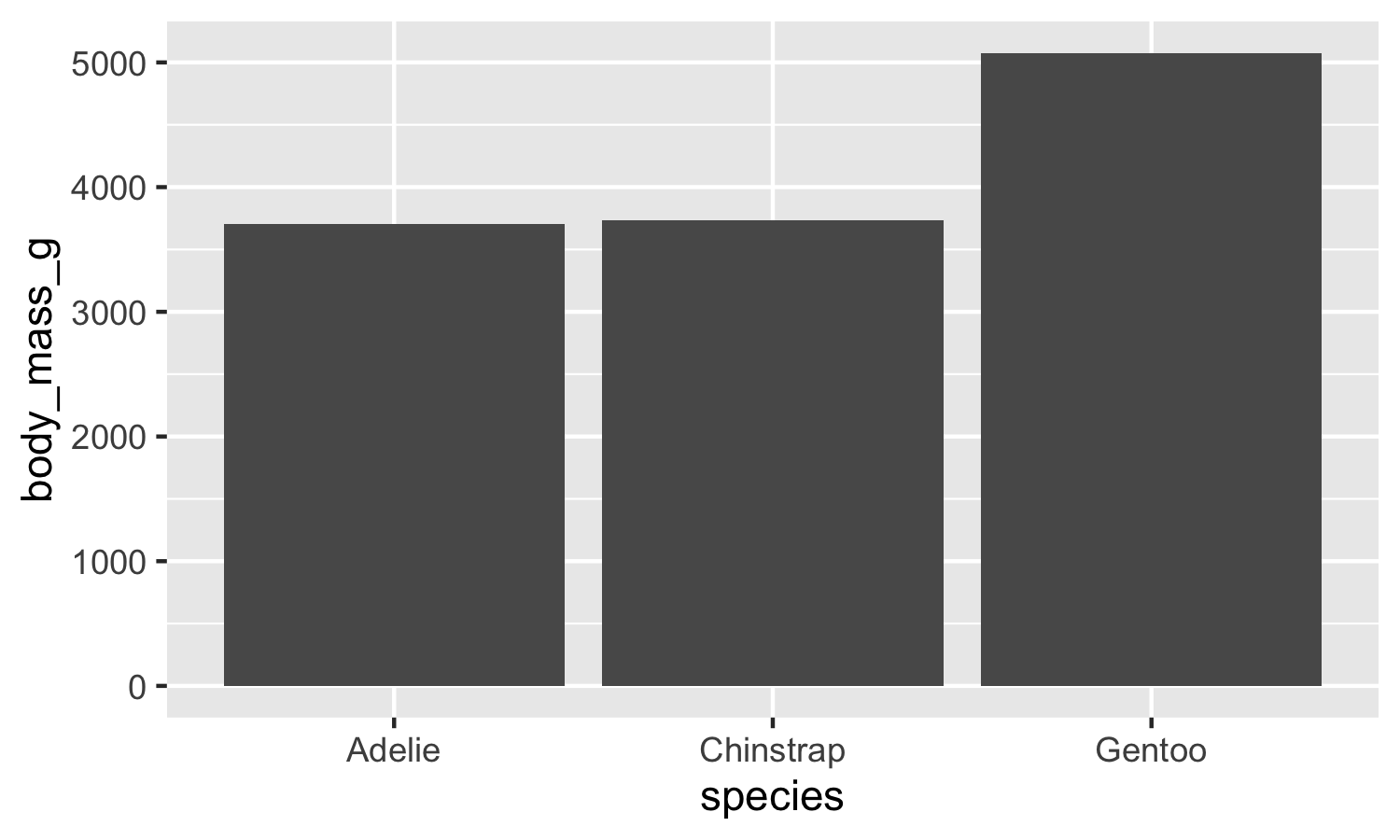
fct_reorder() changes the level order, and the plot follows because ggplot2 draws factors in level order. Sorting the data frame instead would not have worked.
2. Collapsing spelling variants to a canonical level.
hosp <- c("General Hospital Main Campus", "Gen. Hospital",
          "GENHOSP", "Mercy Regional")

canonical <- case_when(
  str_detect(str_to_lower(str_remove_all(hosp, "[^A-Za-z]")),
             "^gen") ~ "General Hospital",
  .default = hosp
)
tibble(raw = hosp, canonical)
#> # A tibble: 4 × 2
#>   raw                          canonical
#>   <chr>                        <chr>
#> 1 General Hospital Main Campus General Hospital
#> 2 Gen. Hospital                General Hospital
#> 3 GENHOSP                      General Hospital
#> 4 Mercy Regional               Mercy Regional
Stripping punctuation and case before matching is what lets one pattern cover all three variants. Note that this collapses GENHOSP correctly and leaves Mercy Regional alone, which is the behavior to check.
3. Parsing mixed formats and flagging failures.
visit_raw <- c("2026-01-14", "02/19/2026", "Feb 3 2026",
               "not recorded")

parsed <- tibble(visit_raw) |>
  mutate(
    visit_date = parse_date_time(visit_raw,
                                 orders = c("ymd", "mdy", "Bdy")),
    failed = is.na(visit_date)
  )
parsed
#> # A tibble: 4 × 3
#>   visit_raw    visit_date          failed
#>   <chr>        <dttm>              <lgl>
#> 1 2026-01-14   2026-01-14 00:00:00 FALSE
#> 2 02/19/2026   2026-02-19 00:00:00 FALSE
#> 3 Feb 3 2026   2026-02-03 00:00:00 FALSE
#> 4 not recorded NA                  TRUE
The fourth value cannot parse, and the point of the failed column is that it is now data rather than a warning nobody reads. Filtering silently on !is.na(visit_date) would lose the count.
4. A reusable level audit.
5. with_tz against force_tz.
with_tz preserves the moment and relabels it; force_tz preserves the digits and moves the moment. Use with_tz when combining data recorded in different zones, and force_tz only to repair a timestamp that was stamped with the wrong zone to begin with.
19.15 Further reading
-
(Wickham et al., 2023) Chapters 14–18,
forcats,stringr,lubridate. - (Bryan & Stephens, 2019) Chapters 10–13, detailed type-specific coverage.
-
(Grolemund & Wickham, 2011), the
lubridatepaper, for the date and time-zone handling in this chapter. - The
regular-expressions.infowebsite, comprehensive regex reference.
19.16 Prerequisites answers
- Before R 4.0,
read.csv()anddata.frame()converted character columns to factors by default. This caused surprise when levels were invented, ordered, or appeared where a character string was expected, for example as merge keys. Downstream analysts had to rememberstringsAsFactors = FALSEor suffer silent coercion. R 4.0 madeFALSEthe default, and the old default is remembered now only when reading elderly code. -
str_detect(string, pattern)returns a logical vector of the same length asstring:TRUEwhere the pattern matched,FALSEelsewhere.str_extract()returns a character vector, namely the first matching substring per input, orNA_character_where there was no match. In short,str_detectis for filtering andstr_extractis for pulling out parts. -
parse_date_time(x, orders = c('ymd', 'mdy', 'Bdy'))(orreadr::parse_datewith multiple format strings) is the tool.lubridate::parse_date_time()tries each order against each input and returns the first that parses. Inputs that match no format produceNA, which lets you flag and inspect them.